If you run a business in Bangladesh, you know that WhatsApp is more than just a messaging app—it’s a primary channel for sales, customer support, and lead generation. But as your business grows, manually replying to every query becomes impossible. This is where n8n WhatsApp automation comes in, allowing you to build a powerful auto-reply bot that works 24/7 to capture leads and support customers, without you writing a single line of code.
This guide is for any Bangladeshi business owner, f-commerce entrepreneur, or marketer who wants to leverage automation to save time and scale their operations. We’ll break down exactly what n8n automation is, how it connects with WhatsApp, and provide practical examples you can implement today.
Key Takeaways
- What it is: n8n WhatsApp automation connects the WhatsApp Business API to other apps (like Google Sheets or an AI) to create automated workflows for messaging.
- How it works: You use n8n’s visual editor to create a flow: a trigger (like a new message) starts a series of actions (like checking the message content and sending a specific reply).
- Why it matters: It saves countless hours, ensures instant replies to customers, captures leads automatically, and can provide 24/7 support without human intervention.
- Getting started: You need a WhatsApp Business API account and an n8n setup (cloud or self-hosted). You can then build workflows using pre-built nodes.
In This Article
- What is n8n WhatsApp Automation? A Clear Definition
- How Does WhatsApp Business API Automation with n8n Work?
- 5 Practical Examples of WhatsApp Automation for Bangladeshi Businesses
- Common Mistakes to Avoid When Building Your WhatsApp Bot
- Your Pre-Launch Checklist for a Successful WhatsApp Bot
- Frequently Asked Questions
- Next Steps: Start Automating Your WhatsApp Today
- Sources
What is n8n WhatsApp Automation? A Clear Definition
n8n WhatsApp automation is the process of using the visual workflow automation tool n8n to connect with the WhatsApp Business Platform and build automated communication sequences. It allows your business to automatically send, receive, and process WhatsApp messages based on predefined triggers and rules, creating everything from a simple WhatsApp auto-reply bot to a sophisticated AI-powered chatbot for your business.
How Does WhatsApp Business API Automation with n8n Work?
The entire system works by connecting different services through n8n's visual 'canvas'. You don’t need to be a programmer to understand it. Think of it like building with LEGO blocks: each block (a 'node') performs a specific task, and you connect them with 'noodles' to pass data from one step to the next, creating a complete automated process called a workflow.
The Core Components: Triggers, Nodes, and Workflows
In n8n, every automation is built on a visual canvas and consists of a few key concepts:
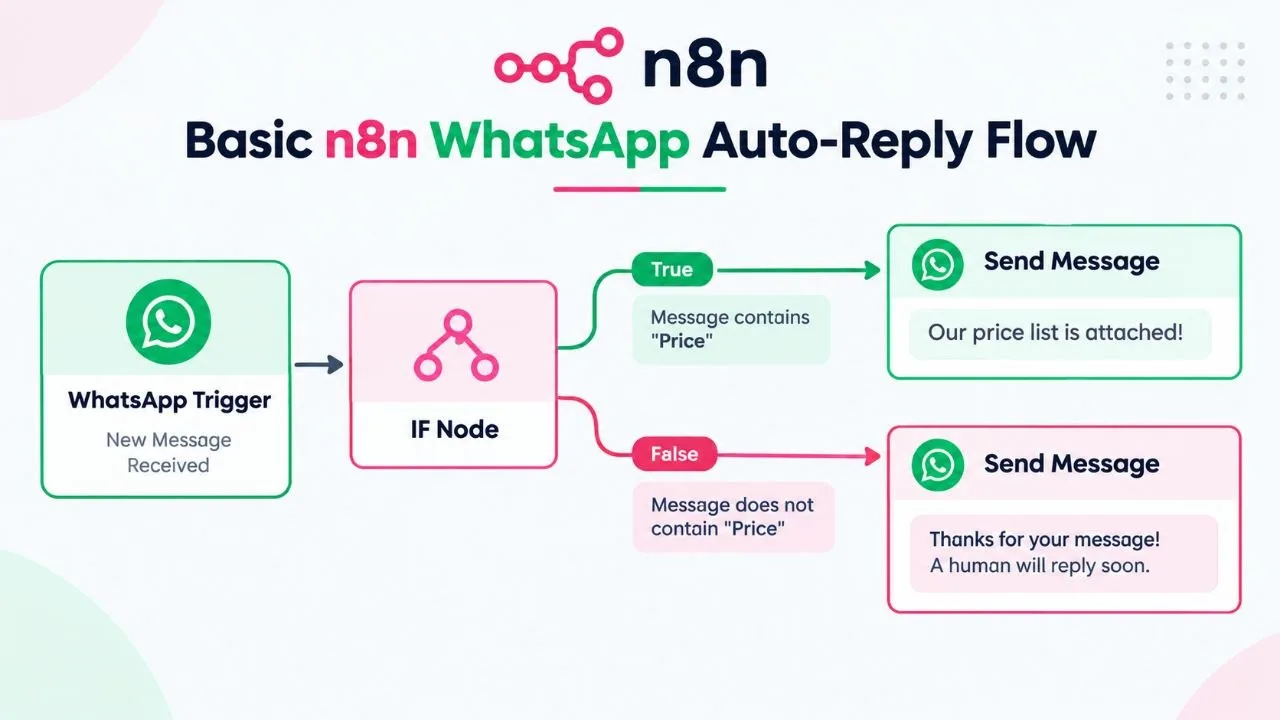
- Trigger Node: This is the starting point that kicks off your automation. While it can be a schedule (e.g., "run every hour") or a webhook from another app, for a WhatsApp bot, the most common is the "WhatsApp Trigger." This node patiently waits and activates the workflow the instant your business number receives a new message.
- Action Nodes: These are the subsequent steps that perform the work. Each node is a block representing an app (like Google Sheets, OpenAI, Gmail) or a logic function (like IF, Switch, Merge). Data flows from the trigger into these action nodes. For example, you could use an "IF" node to check for keywords, a "Google Sheets" node to log the lead, an "OpenAI" node to craft a smart reply, and finally, a "WhatsApp Send Message" node to communicate back to the user.
- Connections & Data: The lines connecting the nodes are just as important. They determine the flow of execution and pass data between steps. The output of one node (like the customer's message from the trigger) becomes the input for the next node, allowing you to build dynamic and context-aware responses.
- Workflow: The entire sequence of a trigger and its connected action nodes is called a workflow. A simple workflow might be: (Trigger) New message -> (Action) Send a static reply. A complex workflow can involve dozens of steps, conditional logic, AI, and multiple external services to handle a complete business process.
Choosing Your WhatsApp API: Official Cloud vs. Third-Party
To connect n8n to WhatsApp, you can't just use the regular WhatsApp Business app on your phone. You need API access. There are two main ways to get this:
- Meta WhatsApp Business Cloud API: This is Meta's official, cloud-hosted API. It's powerful, reliable, and often the most cost-effective solution for businesses sending a moderate to high volume of messages. It gives you a direct connection that you can use in n8n. Setting it up requires a Facebook Developer account and some configuration.
- Third-Party API Providers (like WAHA): Some services, like the open-source WAHA (WhatsApp HTTP API), act as a bridge. They often use a linked phone and WhatsApp Web in the background. While sometimes easier to set up for very small-scale use, they may be less stable and carry a higher risk of being blocked by WhatsApp compared to the official Cloud API.
For any serious business application, using the official Meta WhatsApp Business Cloud API is the recommended and most sustainable approach.
5 Practical Examples of WhatsApp Automation for Bangladeshi Businesses
Here are five real-world use cases for n8n WhatsApp automation that are particularly relevant for businesses in Bangladesh, from f-commerce stores to travel agencies.
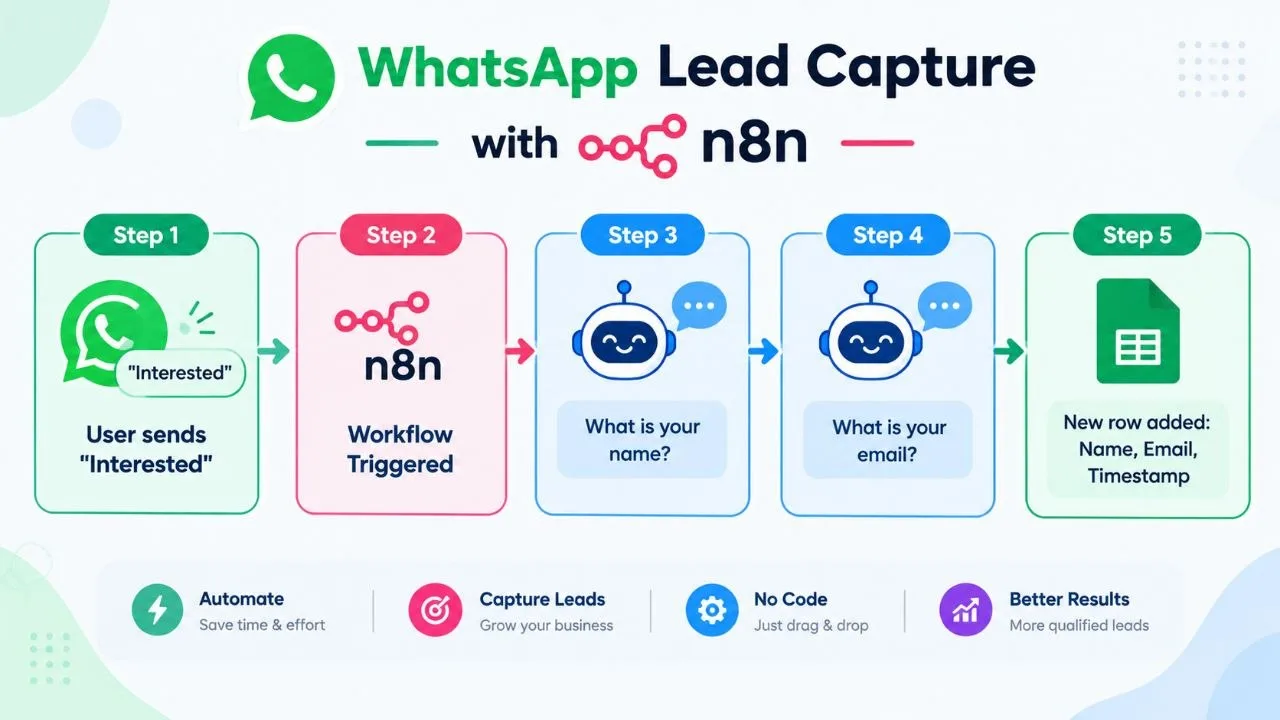
1. Instant Auto-Reply and WhatsApp Lead Automation
The most common use case is a simple but powerful whatsapp auto reply bot. When a potential customer messages you for the first time, you can instantly send a welcome message and ask them for key information.
- Flow: New message received -> Check if it's a new contact -> Send a welcome message ("Thanks for contacting us! How can I help?") -> Ask for their name and what they're interested in -> Save the details to a Google Sheet.
- Benefit: You capture every lead, even outside business hours. The customer gets an instant response, improving their experience.
2. Automated Order Confirmation & Status Updates
For e-commerce and f-commerce businesses, this is a game-changer. Instead of manually typing "Your order is confirmed," you can automate it.
- Flow: Your e-commerce platform (e.g., WooCommerce) sends a webhook to n8n when a new order is placed -> n8n extracts the customer's number and order details -> Send a templated WhatsApp message: "Hi [Customer Name], your order #[Order Number] is confirmed! We will notify you when it ships."
- Benefit: Reduces manual work, minimizes customer anxiety, and provides a professional experience.
3. AI-Powered Customer Support Chatbot
This is where it gets really powerful. By connecting n8n to an AI model like OpenAI's GPT or Google's Gemini, you can build a whatsapp chatbot for business that can answer frequently asked questions.
- Flow: New message received -> Send the message content to an AI node with a prompt like "You are a helpful assistant for a clothing store. Answer the following customer question: [Message Content]" -> Send the AI-generated response back to the customer via WhatsApp.
- Benefit: Provides 24/7 customer support for common questions (e.g., "What are your store hours?", "Do you have a return policy?"), freeing up your team to handle complex issues.
4. Abandoned Cart Reminders
Many online sales are lost when customers add items to their cart but don't complete the purchase. A gentle reminder on WhatsApp can significantly boost recovery rates.
- Flow: Your website detects an abandoned cart -> After 1 hour, it sends a webhook to n8n -> n8n sends a message: "Hi [Customer Name], we noticed you left something in your cart. Would you like to complete your purchase?"
- Benefit: Recovers lost revenue and re-engages interested customers on a platform they check frequently.
5. Broadcasting Promotions (with Caution)
You can use WhatsApp to send promotional messages, but you must follow Meta's policies strictly. Customers must opt-in to receive these messages first, and the messages must be sent as pre-approved templates.
- Flow: You have a list of opted-in customer numbers in a Google Sheet -> Manually trigger an n8n workflow -> n8n reads the list and sends an approved template message to each number: "Our Eid sale is now live! Get 20% off all items. Shop now: [Link]".
- Benefit: High open rates and direct communication for marketing campaigns. However, spamming will get your number blocked quickly.
Common Mistakes to Avoid When Building Your WhatsApp Bot
Building a bot is easy, but building a *good* bot requires careful planning. Based on public information and common pitfalls, here are mistakes to avoid:
- Ignoring WhatsApp Commerce Policy: Read Meta's policies carefully. You cannot sell certain items (e.g., alcohol, tobacco, medical drugs) and must be transparent. Violating policies is the fastest way to get your account banned.
- Not Getting Explicit Opt-In: You cannot message users out of the blue. They must initiate the conversation or explicitly agree to receive messages from you. A checkbox on your website checkout or a contact form is a good way to get consent.
- Creating a "Dead End" Bot: If your bot can't answer a question, it shouldn't just say "I don't understand." It must provide an easy way to connect with a human agent.
- Slow or Unresponsive Bot: Test your n8n workflow thoroughly. A slow or buggy bot is more frustrating than no bot at all. Ensure your n8n instance (especially if self-hosted) has enough resources.
- Forgetting About Templated Messages: If you want to start a conversation with a user more than 24 hours after their last message, you *must* use a pre-approved Message Template. Plan and submit these templates in your Meta Business Manager ahead of time.
Your Pre-Launch Checklist for a Successful WhatsApp Bot
Before you activate your workflow and announce your new WhatsApp bot to the world, run through this checklist.
| Check Item | Why It's Important |
|---|---|
| Set up WhatsApp Business API | You need an official API connection, not the standard business app. |
| Define the Bot's Goal | Is it for lead capture, support, or sales? A clear goal prevents a confusing user experience. |
| Map Out the Conversation Flow | Sketch out the user journey and bot responses before building in n8n. |
| Create a "Human Handover" Path | Ensure users can easily request to speak with a person at any time. |
| Test with Multiple Scenarios | Test for expected keywords, typos, and unexpected questions to see how the bot reacts. |
| Review n8n Automation Costs | Understand the costs involved, including n8n hosting, API fees, and potential n8n automation costs if you hire a specialist. |
| Promote Your WhatsApp Number | Add your WhatsApp number to your website, Facebook page, and email signature so customers can find it. |
Frequently Asked Questions
Do I need to know coding to use n8n for WhatsApp automation?
No, you do not need to be a coder. n8n is a visual workflow builder where you connect nodes (apps and functions) in a drag-and-drop interface. While some advanced functions can use code, 95% of what most businesses need for a WhatsApp auto-reply bot can be built without writing any code.
Is WhatsApp automation free?
It depends. n8n has a free, self-hosted option, but you'll need a server. The WhatsApp Business Cloud API has a free tier of 1,000 conversations per month, but charges per conversation after that. So, for small volumes it can be very low-cost, but not entirely free at scale.
Can I use my personal WhatsApp number for this?
No, you cannot. WhatsApp automation requires the WhatsApp Business Platform API, which is separate from the personal app and the free Business App. You will need to get a new number or migrate an existing number (that isn't tied to a personal account) to the API platform.
What is the difference between n8n and Zapier for WhatsApp?
Both n8n and Zapier can automate WhatsApp, but n8n is generally more powerful, flexible, and cost-effective, especially if you self-host it. Zapier is often simpler for beginners but can become very expensive as your usage grows. n8n gives you more control over your data and workflows.
How do I get a WhatsApp Business API account?
You need to sign up through the Meta for Developers portal. This involves creating a Facebook Business Manager account, undergoing business verification, and setting up a phone number for the API. It’s a multi-step process that requires some technical configuration but is well-documented by Meta.
Can my WhatsApp bot send images and PDFs?
Yes, absolutely. The n8n WhatsApp node allows you to send various media types, including images, documents (like PDFs), videos, and audio files. This is great for sending product catalogs, invoices, or tutorial videos automatically to your customers directly in the chat.
What happens if my WhatsApp bot gets a question it cannot answer?
A well-designed bot should have a "fallback" option. In n8n, you can create a rule that if the bot doesn't understand the query, it sends a message like, "I'm sorry, I can't help with that. Let me connect you to a human agent." It can then notify your team via email or Slack.
Is it safe to automate WhatsApp? Can my number get banned?
It is safe if you follow Meta's rules. The biggest risks are sending unsolicited promotional messages (spam) and not getting user opt-in. As long as you use the official API, provide value, and respect user consent, the risk of being banned is very low.
Next Steps: Start Automating Your WhatsApp Today
Automating your WhatsApp communication can transform your business operations, saving you time and improving customer satisfaction. By starting small with a simple auto-reply and gradually adding more complex features, you can build a robust system that works for you around the clock.
- Analyze Your Needs: Identify the most repetitive task in your WhatsApp communication. Is it answering price queries? Capturing leads? Start there.
- Set Up Your Tools: Get your WhatsApp Business API account approved and choose your n8n hosting option (cloud or self-hosted).
- Build Your First Workflow: Start with a simple "Hello" auto-reply. Use the n8n documentation and templates to guide you.
- Test, Iterate, and Improve: Activate your workflow, monitor its performance, and gather feedback to make it even better.
If the process seems too technical or you want a professionally built, customized solution that perfectly fits your business needs, consider working with a specialist. As an AI automation expert, I help Bangladeshi businesses implement powerful workflows just like these. Feel free to reach out to discuss my AI workflow automation services.
Related Reading
- AI Automation for Small Business in Bangladesh: Complete 2026 Guide
- n8n Automation Cost in Bangladesh: What to Expect to Pay
Sources
- WhatsApp Business Cloud integrations | n8n
- Building your first WhatsApp chatbot | n8n workflow template
- WhatsApp Automation with n8n - WAHA
Checked on 2026-10-21.