Tired of paying high monthly fees for Zapier or Make, especially as your automation usage grows? The most powerful and cost-effective solution is to self host n8n, the open-source workflow automation tool. This approach gives you unlimited workflows, full control over your data, and a predictable, low monthly cost, a game-changer for businesses in Bangladesh.
While it sounds technical, this guide makes the n8n VPS setup with Docker surprisingly straightforward. By following these steps, you can install n8n on your own server with a custom domain and a free, auto-renewing SSL certificate in about an hour.
Key Takeaways
- Why Self-Host: Gain unlimited workflows, enhanced data privacy, and escape the scaling costs of SaaS platforms like Zapier and Make.
- The Cost: Expect to pay around ৳700-৳1,500 BDT per month for a VPS. This is a flat fee, regardless of how many thousands of tasks you run.
- The Method: Using Docker and Docker Compose on an Ubuntu VPS is the most reliable, scalable, and maintainable way to install and manage n8n.
- Prerequisites: You will need a VPS (like from Hostinger), a domain name, and basic comfort with copy-pasting commands into a terminal.
- Outcome: A secure, private n8n instance running at `https://n8n.yourdomain.com`, ready to automate your business processes.
On This Page
- Why Self-Host n8n? The Business Case
- Prerequisites for Your n8n VPS Setup
- The 7 Steps to Self-Host n8n with Docker
- Post-Installation: Maintenance and Security
- Frequently Asked Questions
- Next Steps: Start Automating
- Sources
Why Self-Host n8n? The Business Case
The primary reason businesses choose to self-host n8n is to achieve significant cost savings at scale while gaining complete control over their automation infrastructure. Cloud platforms are convenient but are designed to become more expensive as you become more reliant on them. Let's break down the benefits.
Unbeatable Cost Savings at Scale
With a self-hosted instance, you pay a fixed monthly price for your server. The n8n Community Edition software itself is free. Compare this to the variable, per-task pricing of most SaaS platforms. For a growing business, the difference is dramatic.
Here’s an estimated cost comparison for running 50,000 automation tasks per month (as of late 2026):
| Platform | Estimated Monthly Cost (BDT) | Notes |
|---|---|---|
| Self-Hosted n8n | ৳1,200 | Based on a typical 2GB RAM VPS plan. |
| Make.com | ৳10,000+ | Estimate based on their tiered pricing for operations. |
| Zapier | ৳25,000+ | Estimate based on their tiered pricing for tasks. |
Note: SaaS prices are estimates based on public pricing and can change. The self-hosted cost is stable.
Complete Data Privacy and Control
When you self-host n8n, all your data—including sensitive customer information and API credentials—resides on your own server. Your data never passes through a third-party company's infrastructure. This is a critical advantage for businesses concerned with data privacy, compliance (like GDPR), or simply wanting to own their data stack.
Total Customization and No Limits
The free Community Edition of n8n allows for unlimited workflows and unlimited executions. You are only limited by the power of your server, which you can easily upgrade as needed. You can also create custom n8n nodes or modify the source code, offering a level of flexibility that closed-source platforms cannot match.
Prerequisites for Your n8n VPS Setup
Before we start the installation, let's ensure you have everything you need. This guide is beginner-friendly, so don't worry if you're new to servers.
- A Virtual Private Server (VPS): This is a small, private server in the cloud. We recommend a plan with at least 1 vCPU, 2GB RAM, and 40GB of NVMe storage. A provider like Hostinger is excellent for beginners due to its user-friendly interface and affordable plans. Choose Ubuntu 22.04 LTS as your operating system during setup.
- A Domain Name: You need a domain to access n8n securely over HTTPS. We will set it up on a subdomain, like
n8n.yourbusiness.com. - An SSH Client: This is a tool to connect to your server and run commands. Windows users can use PuTTY or the built-in Windows Terminal. macOS and Linux users can use the native Terminal app.
The 7 Steps to Self-Host n8n with Docker
This tutorial uses Docker Compose, the official recommended method from n8n. It packages the application and its dependencies into clean, manageable containers. Follow these numbered steps precisely.
Step 1: Choose and Prepare Your VPS
First, purchase a VPS plan that meets the prerequisites above. During checkout, select Ubuntu 22.04 LTS as the operating system. After your purchase is complete, your provider will give you four key pieces of information:
- Your Server's IP Address (e.g., `123.45.67.89`)
- A Username (usually `root`)
- A Password (or an SSH key)
- The SSH Port (usually `22`)
Use your SSH client to connect to the server. The command typically looks like this (replace with your details): `ssh root@123.45.67.89`.
Step 2: Point Your Domain to the VPS
Next, log in to your domain registrar (where you bought your domain name). Find the DNS or "Domain Name System" management page. You need to create an A record to point your chosen subdomain to your server's IP address.
- Type: A
- Host/Name: Enter your desired subdomain, like `n8n`. (The registrar will automatically append `.yourdomain.com`).
- Value/Points to: Your VPS IP address (e.g., `123.45.67.89`).
- TTL (Time to Live): Leave this at the default setting (often 1 hour or "Automatic").
DNS changes can sometimes take a few hours to update worldwide, but it's usually faster. You can check the status using a tool like `whatsmydns.net`.
Step 3: Install Docker and Docker Compose
Once connected to your VPS via SSH, it's time to install the container software. We will run three commands. These will update your server, install Docker Engine, and then install Docker Compose.
Copy and paste these commands into your terminal one by one, pressing `Enter` after each.
# 1. Update your server's package list and upgrade existing packages
sudo apt update && sudo apt upgrade -y

# 2. Download and run the official Docker installation script
curl -fsSL https://get.docker.com -o get-docker.sh
sh get-docker.sh

# 3. Install Docker Compose v1 (required by many simple setups)
sudo apt install docker-compose -y
This process automates the entire Docker setup, ensuring you have the correct version for your system.
Step 4: Create the n8n Directory and `docker-compose.yml` File
This step defines the entire structure of your n8n service. We will create a folder to hold our configuration and then create the main `docker-compose.yml` file within it.
First, create a directory and move into it:
mkdir ~/n8n-data
cd ~/n8n-data
Next, create the configuration file using the `nano` text editor:
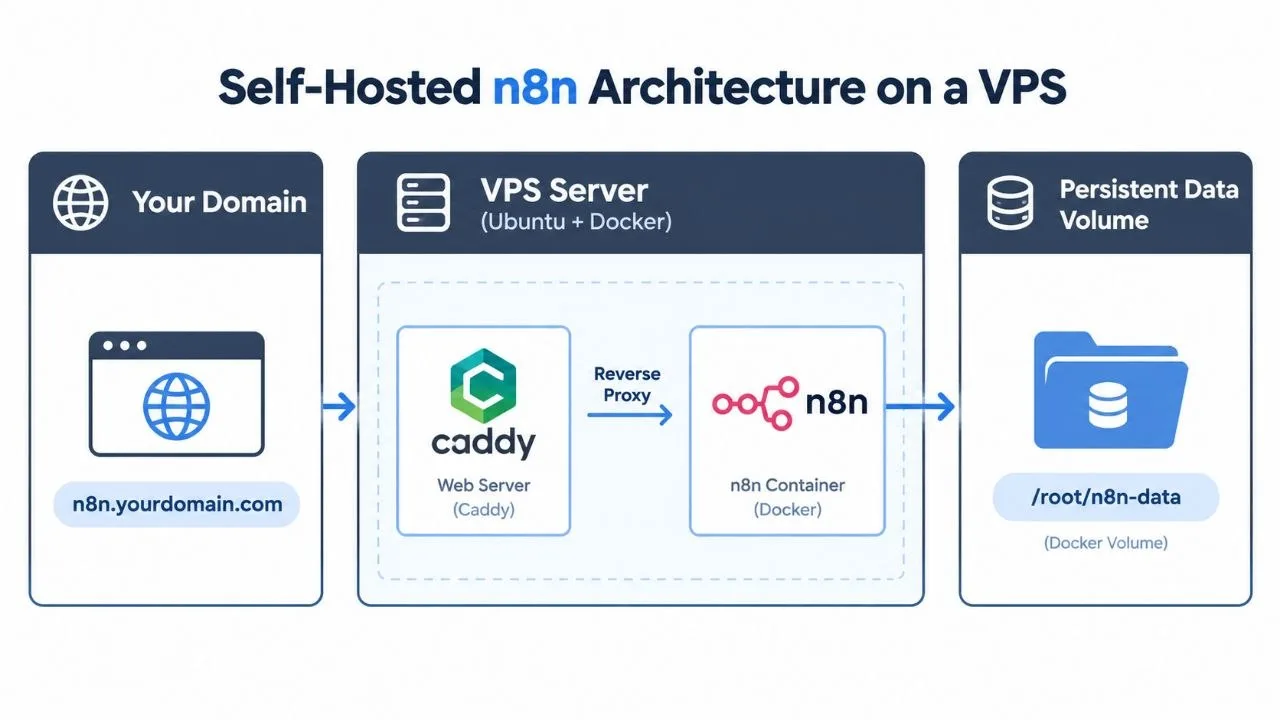
nano docker-compose.ymlNow, copy the entire code block below and paste it into the nano editor. This configuration, adapted from the official n8n documentation, defines two services: `n8n` itself and `caddy`, a modern web server that will act as a reverse proxy and automatically handle getting you a free SSL certificate.
version: '3.7'

services:
  caddy:
    image: caddy:latest
    restart: unless-stopped
    ports:
      - "80:80"
      - "443:443"
    volumes:
      - caddy_data:/data
      - ./Caddyfile:/etc/caddy/Caddyfile

  n8n:
    image: n8nio/n8n
    restart: unless-stopped
    ports:
      - "127.0.0.1:5678:5678"
    environment:
      - N8N_HOST=${SUBDOMAIN}.${DOMAIN_NAME}
      - N8N_PORT=5678
      - N8N_PROTOCOL=https
      - NODE_ENV=production
      - WEBHOOK_URL=https://${SUBDOMAIN}.${DOMAIN_NAME}/
      - GENERIC_TIMEZONE=${GENERIC_TIMEZONE}
    volumes:
      - n8n_data:/home/node/.n8n

volumes:
  caddy_data:
    external: false
  n8n_data:
    external: false
To save the file and exit nano, press `Ctrl+X`, then `Y`, then `Enter`.
Step 5: Configure Your Domain and Timezone
The `docker-compose.yml` file we just created uses variables. We need to define these variables in a separate `.env` file for security and easy configuration.
Create the `.env` file:
nano .envPaste the following text into the editor. Crucially, you must replace the placeholder values with your actual subdomain, domain, and local timezone. For Bangladesh, the timezone is `Asia/Dhaka`.
# Subdomain for n8n. E.g. n8n
SUBDOMAIN=n8n

# The top-level domain. E.g. yourbusiness.com
DOMAIN_NAME=yourdomain.com

# The timezone to use for cron nodes. E.g. America/New_York
GENERIC_TIMEZONE=Asia/Dhaka
Save and exit (`Ctrl+X`, `Y`, `Enter`).
Next, create the `Caddyfile` which tells our Caddy webserver how to direct traffic to the n8n application.
nano CaddyfilePaste the following line, again replacing the placeholder with your full domain:
n8n.yourdomain.com {
    reverse_proxy n8n:5678
}
Save and exit (`Ctrl+X`, `Y`, `Enter`). This tells Caddy: "When a request comes in for `n8n.yourdomain.com`, forward it internally to the n8n service on port 5678."
Step 6: Start n8n and Troubleshoot
With all configuration files in place, you are ready to launch! From your `~/n8n-data` directory, run this single command:
sudo docker-compose up -dThis command does several things: it reads your configuration, downloads the latest `caddy` and `n8n` images, creates the persistent data volumes, and starts the containers in the background (`-d` for "detached" mode). The first time you run this, it may take a few minutes to download the images.
Caddy will automatically contact Let's Encrypt to provision a free SSL certificate for your domain. You can watch the logs in real-time to see this happen:
sudo docker-compose logs -f caddyLook for messages about "obtaining certificate" and "certificate obtained successfully". Once you see that, your site is live and secure. Press `Ctrl+C` to stop viewing the logs.
Troubleshooting Common Errors
- Error: "port is already allocated" on port 80 or 443. This means another web server (like Apache or Nginx) is already running on your VPS. You must stop and disable it before Caddy can work.
- Browser shows a security warning. This usually means Caddy failed to get an SSL certificate. The most common cause is that your DNS A record has not propagated yet. Wait an hour and try restarting Caddy with `sudo docker-compose restart caddy`.
- 502 Bad Gateway Error. This means Caddy is running but cannot connect to the n8n container. Check your n8n logs with `sudo docker-compose logs n8n` to see if it started correctly.
Step 7: First-Time Login and Owner Setup
Congratulations! Your instance is running. Open your web browser and navigate to the full URL you configured (e.g., `https://n8n.yourdomain.com`).
The first time you access this URL, n8n will present a setup screen to create the "owner" account. This is the primary administrative account for your entire n8n instance. Fill in your details and choose a strong, unique password. After completing this step, you will be logged in and taken to the n8n canvas, ready to build your first workflow!
Post-Installation: Maintenance and Security
Running a server means taking responsibility for its maintenance. Here are the essential tasks to keep your self-hosted n8n instance secure and stable for the long term.
How to Update n8n Safely
The n8n team releases updates frequently with new features and bug fixes. Updating with Docker is simple. First, navigate to your n8n directory, then pull the latest image and restart the containers.
cd ~/n8n-data
sudo docker-compose pull
sudo docker-compose up -d
This pulls the newest `n8nio/n8n` image and gracefully restarts your container with the new version. Your data, stored in the `n8n_data` volume, will be preserved.
Essential Backup Strategies
Your workflow data is valuable. Do not skip backups. You have two main options:
- VPS Snapshots (Easiest): Most VPS providers (including Hostinger) offer an automated backup or "snapshot" service for a small extra fee. This is the simplest method. Schedule a daily or weekly snapshot of your entire server for complete peace of mind.
- Manual Backup (Free): You can manually back up the n8n data volume. This involves stopping n8n, creating a compressed archive of the data directory, and then restarting n8n. This can be automated with a cron job.
Basic Server Security Hardening
A public server needs basic protection. Here are two non-negotiable security steps:
- Enable the Firewall: Ubuntu comes with `UFW` (Uncomplicated Firewall). We need to allow SSH and HTTP/HTTPS traffic, then enable it.
sudo ufw allow ssh
sudo ufw allow http
sudo ufw allow https
sudo ufw enable- Use Strong Passwords: Ensure your server's root password and your n8n owner account password are long, complex, and unique.
For more details on the ongoing costs and maintenance, see our full breakdown of n8n automation costs in Bangladesh.
Frequently Asked Questions
Is it free to self-host n8n?
Yes, the n8n Community Edition is free to use when you self-host. You only pay for your VPS, domain, and any associated infrastructure costs. Paid licenses for Business or Enterprise features are available but not required for core functionality.
What are the minimum VPS requirements to self-host n8n?
For a small setup with a moderate number of workflows, a VPS with 1 vCPU, 2GB of RAM, and 40GB of NVMe storage is a good starting point. As your usage grows, you may need to scale up your server resources, particularly RAM.
How much does it cost per month to self-host n8n in Bangladesh?
The primary cost is the VPS, which can start from ৳700-৳1,500 BDT per month from providers like Hostinger or local options. A domain name adds a small annual fee. This is significantly cheaper than paid automation platforms, especially at high volumes.
Can I use a domain I already own?
Absolutely. You just need access to its DNS settings to create an A record pointing to your new VPS IP address. This guide covers the exact steps to link your existing domain to your self-hosted n8n instance.
How do I update my self-hosted n8n instance?
Updating is straightforward with Docker. You navigate to your n8n directory, run `sudo docker-compose pull` to fetch the latest image, and then `sudo docker-compose up -d` to restart the container with the new version. Always back up your data before updating.
What happens if my VPS server goes down?
If your server fails and you don't have backups, you could lose your workflow data. This is why regular, automated backups (like VPS snapshots) of your n8n data volume are critical. Most VPS providers offer this as an add-on service.
Is it more secure to self-host n8n?
Self-hosting gives you control over your data security, which can be a major advantage. However, you are responsible for securing the server. This includes using strong passwords, keeping software updated, and configuring a firewall as shown in this guide.
n8n Cloud vs Self-Hosted: which is better for me?
If you want a zero-maintenance solution and don't mind the cost, n8n Cloud is easier. If you want full control, lower costs at scale, and need to keep your data on your own infrastructure for privacy reasons, you should self-host n8n.
Can I run other applications on the same VPS?
Yes, you can. Docker makes it easy to run multiple applications in isolated containers on the same server. However, be mindful of your server's CPU and RAM resources, as running too many applications can degrade performance for all of them.
Next Steps: Start Automating
Congratulations! You now have a powerful, private automation platform at your fingertips. The possibilities are nearly endless. Here’s how to get started:
- Explore the Workflow Templates: n8n comes with hundreds of pre-built templates. Open one up (like "Summarize Slack channel with AI") to see how nodes connect and pass data.
- Build a Simple Personal Workflow: Create something fun to learn the ropes. For example, build a workflow that sends you a Telegram message with the day's weather forecast every morning at 8 AM.
- Map Out Your Business Processes: Identify a repetitive, manual task in your business. Is it manually copying lead data from Facebook to Google Sheets? Or sending reminder emails? This is your first target for automation. For more ideas, see this guide on AI automation for small businesses in Bangladesh.
- Get Expert Help for Complex Workflows: If you have a complex process you want to automate but don't have the time to build and maintain it yourself, professional help can deliver a robust solution quickly.
Ready to unlock the full potential of automation for your business without the high SaaS fees? Contact me for AI workflow automation services and let's build a more efficient, streamlined future for your company.
Related Reading
- n8n Automation Cost in Bangladesh: What to Expect to Pay
- AI Automation for Small Business in Bangladesh: Complete 2026 Guide
Sources
Checked on 2026-10-20.