
Choosing the right workflow automation tool in 2026 feels like navigating a maze. You have giants like Zapier, powerful open-source challengers like n8n, and visual powerhouses like Make all vying for your attention. They all promise to save you time by connecting your apps, but their approaches—and costs—are fundamentally different. This is a critical choice for any business, especially in a cost-sensitive market like Bangladesh. This guide cuts through the noise of the n8n vs Zapier debate, adding Make to the mix for a complete picture.
For most Bangladeshi businesses, n8n offers the best balance of power, cost-control, and scalability, especially when self-hosted, while Zapier is best for absolute beginners and Make is a strong visual alternative for those who think in flowcharts.
As an AI automation consultant who specializes in n8n, I have a clear preference for its power and flexibility. However, this comparison aims to be fair, highlighting the genuine strengths of Zapier and Make to help you choose based on your specific business needs, not mine.
Key Takeaways
- Zapier: The easiest to use with the most app integrations (7,000+), but its per-task pricing model can become very expensive, especially for complex workflows. Best for simple, linear tasks.
- Make: A great middle-ground with a powerful visual editor that’s more flexible than Zapier and more intuitive for some than n8n. Its pricing is generally more favorable than Zapier's for multi-step workflows.
- n8n: The most powerful and cost-effective solution, especially when self-hosted. It offers unlimited control, robust AI features, and a "pay per execution" model that saves money on multi-step workflows.
In This Article
- The Verdict at a Glance: Which Tool Wins in 2026?
- n8n vs. Zapier vs. Make: Side-by-Side Comparison
- Deep Dive: Key Differences Explained
- The Verdict: Which Tool is Best for Your Business Type?
- Migrating from Zapier or Make to n8n
- Frequently Asked Questions
- Next Steps: Start Your Automation Journey
- Related Reading
- Sources
The Verdict at a Glance: Which Tool Wins in 2026?
Before we dive deep, here’s the quick answer based on your primary need. Each tool has a clear winner in its category.
- For Absolute Beginners & Maximum Simplicity: Zapier
- For Visual Thinkers & Complex Logic: Make
- For Developers, Full Control & Best Value: n8n
n8n vs. Zapier vs. Make: Side-by-Side Comparison
Let's break down the core differences in a table. While Zapier boasts the highest number of integrations, the most important factors for your business will likely be the pricing model, hosting options, and customization capabilities.
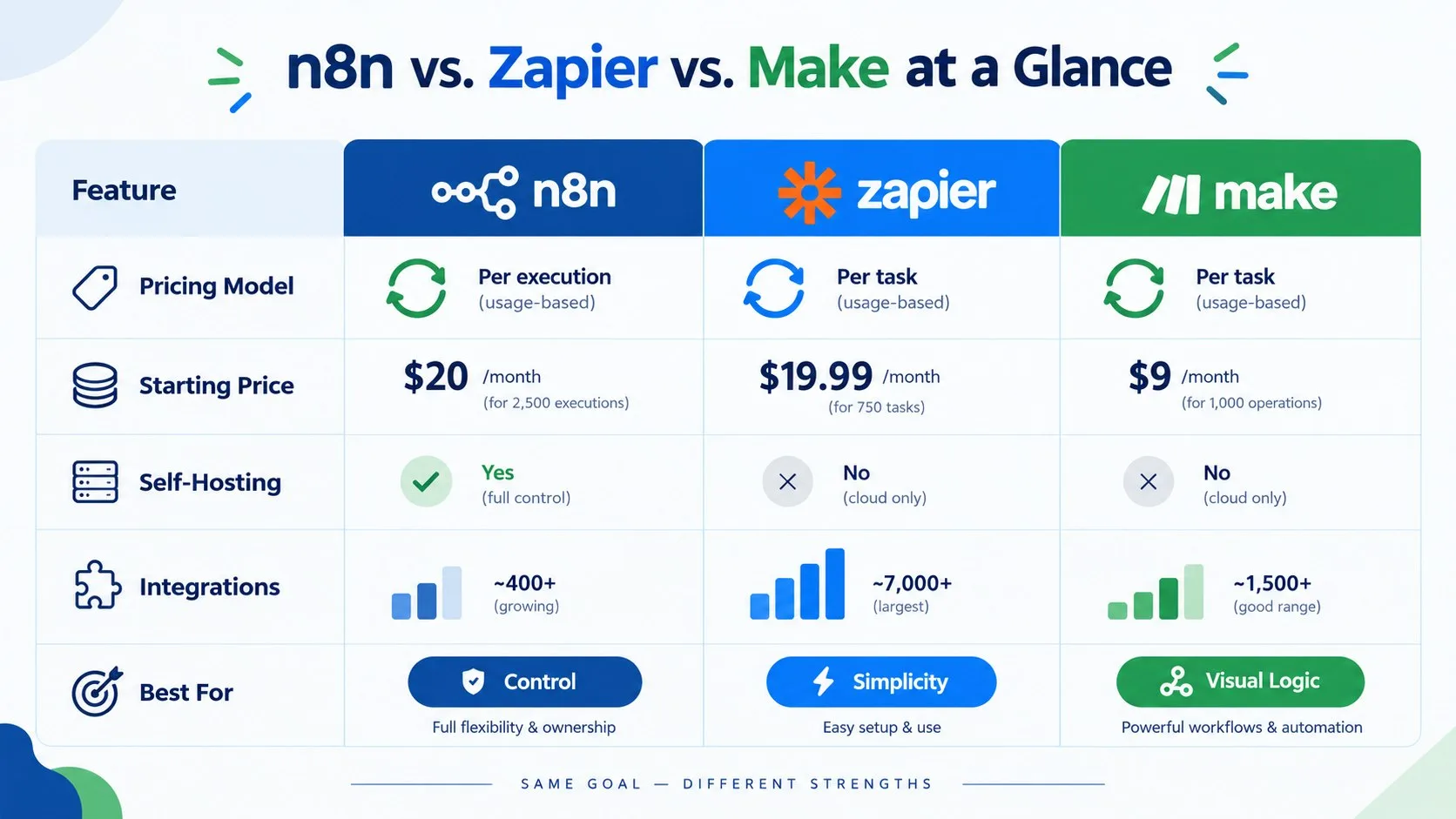
| Feature | n8n | Zapier | Make |
|---|---|---|---|
| Pricing Model | Per Workflow Execution | Per Task | Per Operation |
| Starting Paid Price | $20/month (2,500 executions) | $19.99/month (750 tasks) | Competitive with Zapier |
| Free Plan | Unlimited (self-hosted) or generous cloud tier | 100 tasks/month, 2-step Zaps only | 1,000 operations/month |
| Self-Hosting | ✅ Yes (Full Control & Data Privacy) | ❌ No | ❌ No |
| Data Sovereignty | Full control when self-hosted | Data on Zapier's US servers | Data on Make's EU servers |
| Integrations | ~450+ Native, 600+ Community | 7,000+ Apps | 1,200+ Apps |
| Ease of Use | Moderate (Node-based, technical) | Very Easy (Linear, step-by-step) | Easy (Visual flowchart) |
| Error Handling | Advanced, customizable per node | Basic, auto-replay | Visual, requires manual routing |
| Custom Code | Native JavaScript & Python nodes | Basic JavaScript/Python steps | Limited custom functions |
| AI Features | Advanced (Native AI agents, memory) | Basic (Simple AI actions) | Basic (AI assistants) |
| Best For | Developers, SMBs, Agencies, Cost-Control | Beginners, Marketers, Simple Tasks | Visual Power Users, Complex Scenarios |
Deep Dive: Key Differences Explained
The table gives you the overview, but the devil is in the details. How these differences play out in the real world will determine which tool saves you money and which one creates limitations.
Pricing Models: Executions vs. Tasks vs. Operations
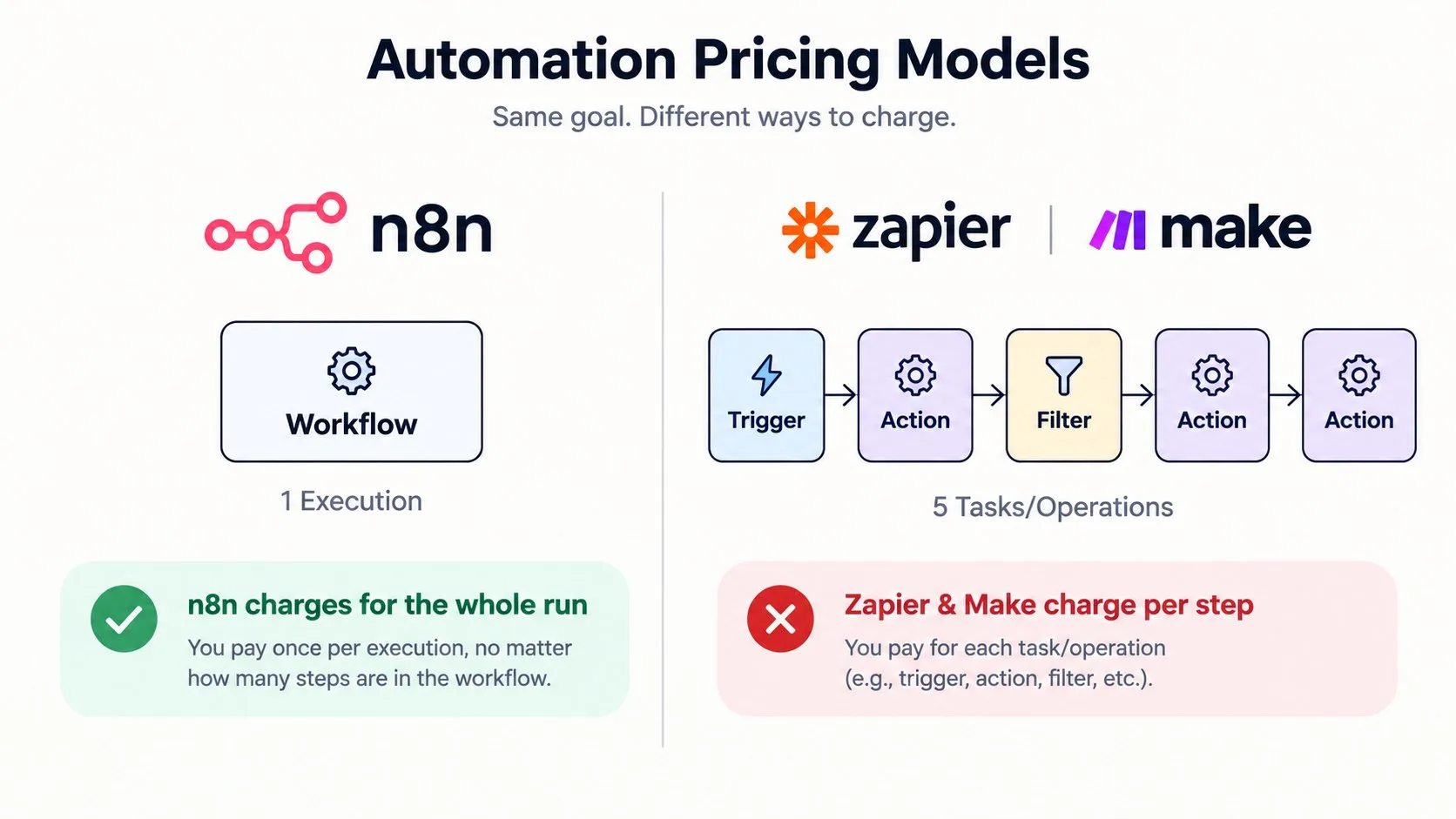
This is the single most important difference. Imagine you have a workflow to handle new leads from your Facebook Ads:
- Lead comes in (Trigger)
- Add lead to Google Sheets (Action)
- Check if the lead is a high-priority client (Filter)
- If yes, send a notification to your sales team on WhatsApp (Action)
- Add the lead to your email marketing list (Action)
This is a 5-step workflow. With Zapier, this single event would consume up to 5 "tasks" from your monthly quota. With Make, it could be 5 "operations". If you get just 50 leads a day, that's 250 tasks/operations daily. You would exhaust Zapier’s $19.99/mo plan (750 tasks) in just three days. With n8n, the entire 5-step workflow run counts as just one "execution". Those same 50 leads are only 50 executions, easily fitting within the starter cloud plan and costing virtually nothing if you self-host.
Self-Hosting & Data Sovereignty: The n8n Advantage
n8n is open-source, which means you can install it on your own server (a practice known as self-hosting). For Bangladeshi businesses, this is a game-changer for two reasons:
- Cost: Instead of paying high monthly subscription fees, you only pay for a Virtual Private Server (VPS), which can be found for a few dollars per month. This drastically reduces your overhead, a key consideration for any AI automation for small business in Bangladesh.
- Data Privacy: With Zapier and Make, your customer data is processed on their servers, typically in the US or Europe. For an f-commerce brand, this means your customer's name, phone number, and address from a Facebook Lead Ad pass through a foreign company's servers. Self-hosting n8n keeps all your sensitive business and customer data on your own infrastructure, giving you full control and building trust.
Ease of Use & The Learning Curve
The user experience differs significantly across the three platforms and caters to different ways of thinking.
- Zapier: The simplest to learn. It uses a linear, step-by-step "if this, then that" wizard. It’s perfect for non-technical users who need to set up simple automations quickly without a learning curve. Its simplicity, however, becomes a limitation when trying to build complex, multi-path logic.
- Make: The visual thinker's choice. It presents your automation as a flowchart or mind map, which you build by dragging and dropping modules and connecting them. This makes it incredibly intuitive to visualize complex branching logic and loops, offering more flexibility than Zapier without requiring code.
- n8n: The power user's canvas. It uses a node-based system that feels like a developer's whiteboard. Each node is a step in the workflow, and you connect them to define the data flow. While this offers the most power and granularity, it presents a steeper learning curve for beginners than Zapier or Make.
App Integrations: Does Quantity Beat Quality?
Zapier is the undisputed king of quantity with over 7,000 apps. If your business relies on a dozen different niche software tools, Zapier might be the only platform that connects them all out of the box. However, n8n has a secret weapon: the HTTP Request node. This single node allows you to connect to virtually any application with an API, even if it doesn't have a dedicated integration. For most Bangladeshi businesses using core tools like Facebook, Google Sheets, WhatsApp, and WooCommerce, n8n provides robust native support. For anything else, from local courier services to custom CRMs, the HTTP node means n8n's potential is practically limitless.
AI and Customization: Beyond Simple Connections
In 2026, automation is no longer just about connecting App A to App B. It's about creating intelligent systems. Here, n8n has a significant lead. It has native support for building AI Agents—workflows that can use tools, have memory, and make decisions. For example, you could build an n8n agent that not only responds to a customer query on Facebook but also checks their order status in WooCommerce, looks up delivery info via a courier's API, and then composes a personalized reply in Bangla. This level of complex reasoning is native to n8n but extremely difficult and expensive to replicate in Zapier or Make, which are limited to simpler AI actions like summarizing text.
The Verdict: Which Tool is Best for Your Business Type?
There is no single "best" tool; the right choice depends on your team's skills, budget, and specific needs.
For Freelancers and Solopreneurs in Bangladesh
Winner: n8n (Self-Hosted)
For a solo operator, cost is king. The ability to run a full-featured automation platform for the price of a cheap VPS is an unbeatable advantage. The learning curve is an investment that pays for itself many times over by eliminating expensive subscription fees. The money you save can be reinvested directly into growing your business.
For Small to Medium Businesses (SMBs)
Winner: n8n (Cloud or Self-Hosted)
SMBs need a solution that can scale. You might start with simple automations but will quickly grow into more complex workflows involving inventory, customer support, and marketing. n8n's "per execution" pricing and scalable architecture mean you won't be penalized for building the sophisticated systems you need to grow. Check out our guide on n8n automation costs in Bangladesh to see how affordable this can be.
For Digital Marketing Agencies and f-commerce
Winner: n8n
Based on my experience, agencies and e-commerce businesses in Bangladesh run complex, multi-step funnels. Automating Facebook Lead Ads, managing customer data in Google Sheets, sending personalized WhatsApp abandoned cart reminders, and updating CRM systems are common needs. n8n's ability to handle this complexity without racking up huge "task" fees makes it the clear professional choice. You can build one master workflow and reuse it for multiple clients, a huge efficiency gain.
For Developers and Tech-Savvy Teams
Winner: n8n
This isn't even a contest. If you have developers on your team, they will choose n8n every time. The access to source code, ability to write custom JavaScript/Python nodes, robust error handling, and the power of self-hosting provide a level of control and flexibility that proprietary platforms like Zapier and Make can never match.
Migrating from Zapier or Make to n8n
Thinking of making the switch? It's a smart move for long-term savings and scalability. While there's no automatic migration tool, the process is straightforward if you approach it strategically.
- Start Small: Don't try to move everything at once. Pick one of your most expensive or most limited workflows on Zapier/Make and rebuild it in n8n.
- Learn the Logic: Familiarize yourself with n8n's node-based logic. The concepts are similar (triggers, actions, logic), but the implementation is different. Watch a few tutorials to grasp the data flow.
- Phase the Migration: Once you're comfortable, move your workflows over one by one. This ensures a smooth transition without interrupting your business operations.
- Enjoy the Savings: Watch your monthly automation bill plummet, especially if you opt for the self-hosted route.
Frequently Asked Questions
Is n8n really free?
Yes, n8n has a "fair-code" license, meaning its source code is available and you can self-host it on your own server for free, with unlimited workflows and executions. You only pay for the hosting infrastructure. They also offer paid cloud plans with managed hosting and support.
Can n8n replace Zapier completely?
For many users, yes. n8n can replicate and often enhance most Zapier workflows, especially if you need complex logic or custom code. However, Zapier's main advantage is its vast number of pre-built app integrations (7,000+), which might be a deciding factor if you rely on many niche applications.
Which is easier to learn, n8n or Make?
Make is generally considered easier to learn initially due to its highly visual, drag-and-drop flowchart interface. n8n uses a node-based system that is incredibly powerful but presents a slightly steeper learning curve for non-technical users. However, both are more complex to master than Zapier.
For a Bangladeshi business, which tool is most cost-effective?
For most Bangladeshi businesses, self-hosted n8n is by far the most cost-effective option, as you only pay for low-cost local or international VPS hosting. For cloud versions, n8n and Make often provide better value than Zapier for complex, multi-step workflows due to their more generous pricing models.
Is self-hosting n8n difficult?
It requires some technical comfort but has become much easier. With tools like Docker, you can get a secure n8n instance running on a Virtual Private Server (VPS) in under an hour by following a guide. It's a manageable task for a tech-savvy business owner or a freelance developer.
Which tool is better for AI automation?
As of 2026, n8n has more robust, native AI capabilities. It allows for building complex AI agents with memory and tool-use functionalities, directly within the platform. Zapier and Make have integrated AI for basic tasks like text generation, but n8n offers deeper control for creating sophisticated AI-driven workflows.
What are the limitations of Zapier's free plan?
Zapier's free plan is quite limited. As of late 2026, it allows only 100 tasks per month and your Zaps can only have two steps (a trigger and one action). Multi-step Zaps and access to Premium apps require a paid plan, making it suitable only for very basic automations.
Is Make.com cheaper than Zapier?
Generally, yes. Make's pricing per operation is often more generous than Zapier's per-task cost. For workflows with many steps, Make usually comes out significantly cheaper. Their Core plan starts at a lower price point than Zapier's entry-level paid plan and includes more operations.
Next Steps: Start Your Automation Journey
Ready to stop doing repetitive tasks and start building a more efficient business? Here’s how to begin:
- Audit Your Time: For one week, list every repetitive task you do. This could be copying lead info from Facebook to Google Sheets, sending welcome emails, or manually creating weekly reports. Be specific.
- Test the Waters: Sign up for the free plan on all three platforms. Get a feel for the user interface and how they approach building a simple workflow.
- Build a Test Workflow: Try automating one of the simple tasks you identified. See which platform feels most intuitive and which one's limitations you hit first.
- Project Your Costs: Estimate how many times you'll run your workflows and how many steps they have. Use this to project your monthly cost on each platform's pricing page. The difference will be eye-opening.
- Get Expert Help: If you see the potential but don't have the time to become an automation expert yourself, consider bringing in a specialist to build a solid foundation for your business.
At Abir Hasan Sabbir Digital, I specialize in helping Bangladeshi businesses leverage the power of AI and automation with n8n. Whether you need to capture leads, streamline operations, or build a custom AI chatbot, I can design and implement a scalable, cost-effective solution for you. Book a consultation today to discuss your automation needs.
Related Reading
- n8n Automation Cost in Bangladesh: What to Expect to Pay
- AI Automation for Small Business in Bangladesh: Complete 2026 Guide
Sources
- n8n vs Zapier Pricing & Comparison 2026: Exact Costs ...
- n8n vs Zapier – Which is right for you?
- Zapier vs. n8n Comparison: Pricing, Security & Self-Hosting
Checked on 2026-10-19.