

An SEO silo strategy groups your pages into clear topic sections, each led by a hub page that links to supporting pages. Done well, it makes your site easier to crawl, easier to navigate, and clearer about what you cover. Done rigidly, it can block useful links and hurt the reader. This guide covers what silos are, the types, when to use them, and a seven-step build plan.
Bottom line: build topic-based sections with hub pages, but keep the walls soft. Link inside each section by default, and add cross-section links wherever a reader would genuinely want them.
Based on public documentation and published expert guidance reviewed on October 10, 2026. No tools or products are ranked in this guide, and no ranking results are claimed.
Key takeaways
A silo is a topic section: one hub page plus the supporting pages beneath it.
Google's own link guidance is about crawlable links and descriptive anchor text. It does not make silos a requirement.
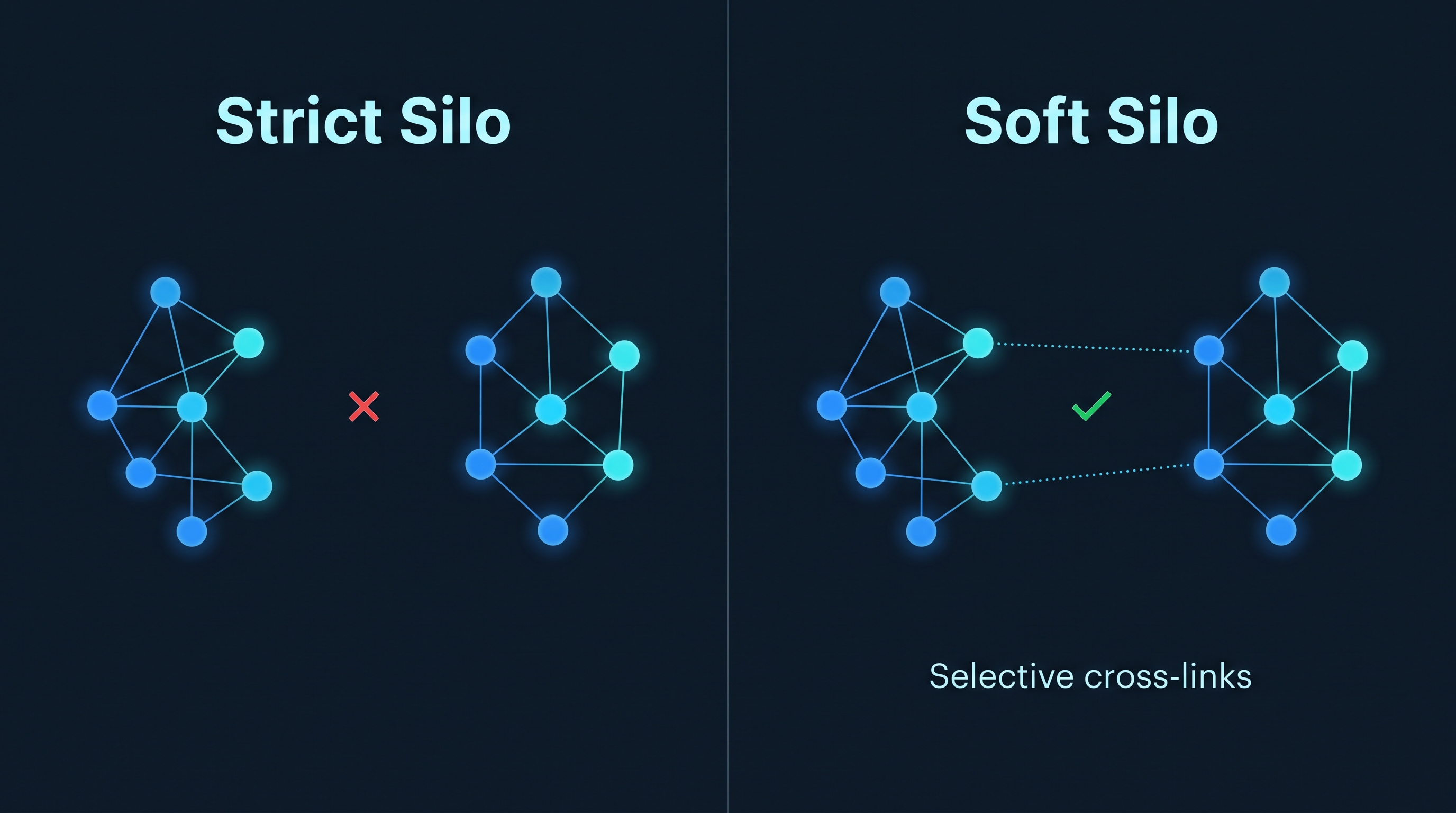
Strict silos forbid links between sections. Most experts who recommend structure today suggest a softer version with selective cross-links.
Physical silos use URL folders. Virtual silos use internal links and navigation. Hybrids use both.
Validate the result with your own data: orphan pages, crawl depth, and Search Console performance per section.
Why site structure still matters
Google uses links in two ways: as a signal of how relevant a page is, and as a way to find new pages to crawl, according to Google's link best practices. That makes internal links the part of your ranking setup you control completely. Backlinks must be earned; internal links are decided by you.
Three practical points follow from that:
Discovery: Google can only reliably follow links written as an
<a>element with anhrefattribute. Links built only with script events may not be parsed.Context: Google's guidance says descriptive anchor text, and the words around a link, help people and Google understand the destination page.
Coverage: A page nobody links to is an orphan. It can sit in your sitemap and still be hard for crawlers to reach through your site's link graph.
A silo strategy is one disciplined way to use those three levers. The question is how strict to make it.
What is an SEO silo?
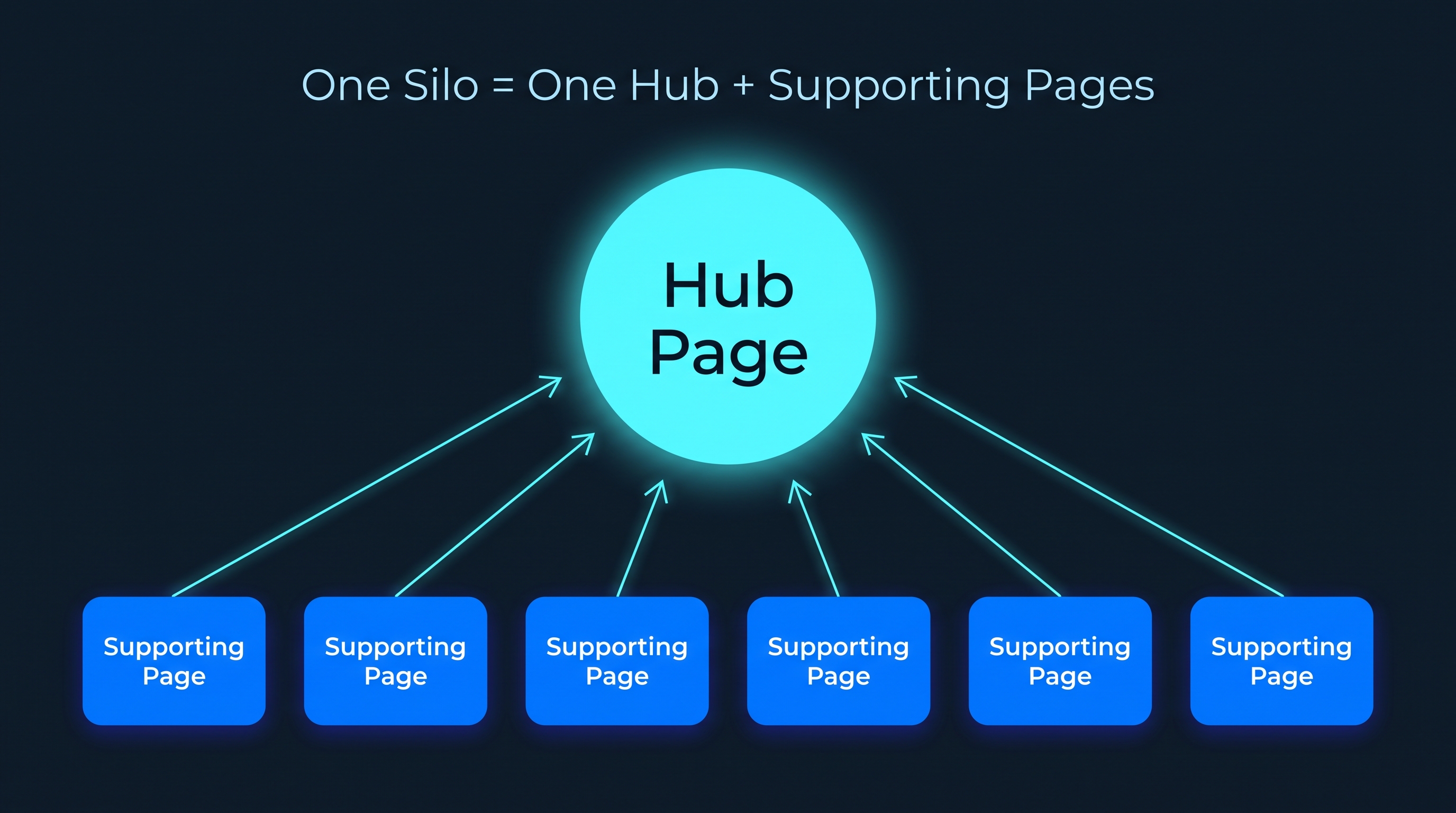
An SEO silo is a way of organizing a website into distinct topic groups, where a main hub page links to supporting pages on subtopics and most internal links stay within the group.
The word comes from the farm silo that keeps one crop separate from others. In SEO, the same idea is applied to content: nutrition pages together, pricing pages together, and so on.
How a silo works in three steps
Choose a theme. Each silo owns one broad topic, such as "strength training."
Create a hub. The hub page (also called a pillar or parent page) covers the topic broadly and links to every supporting page.
Add supporting pages. Each supporting page covers one narrower subtopic or search intent and links back to the hub and to closely related siblings.
Where silos are used
Blogs with several distinct topics
Ecommerce stores with categories and buying guides
Service websites with a service page and supporting articles per service
Software documentation grouped by product area
Publishers with long-running coverage areas
Agencies and local businesses organizing service-plus-location content
Silo types compared
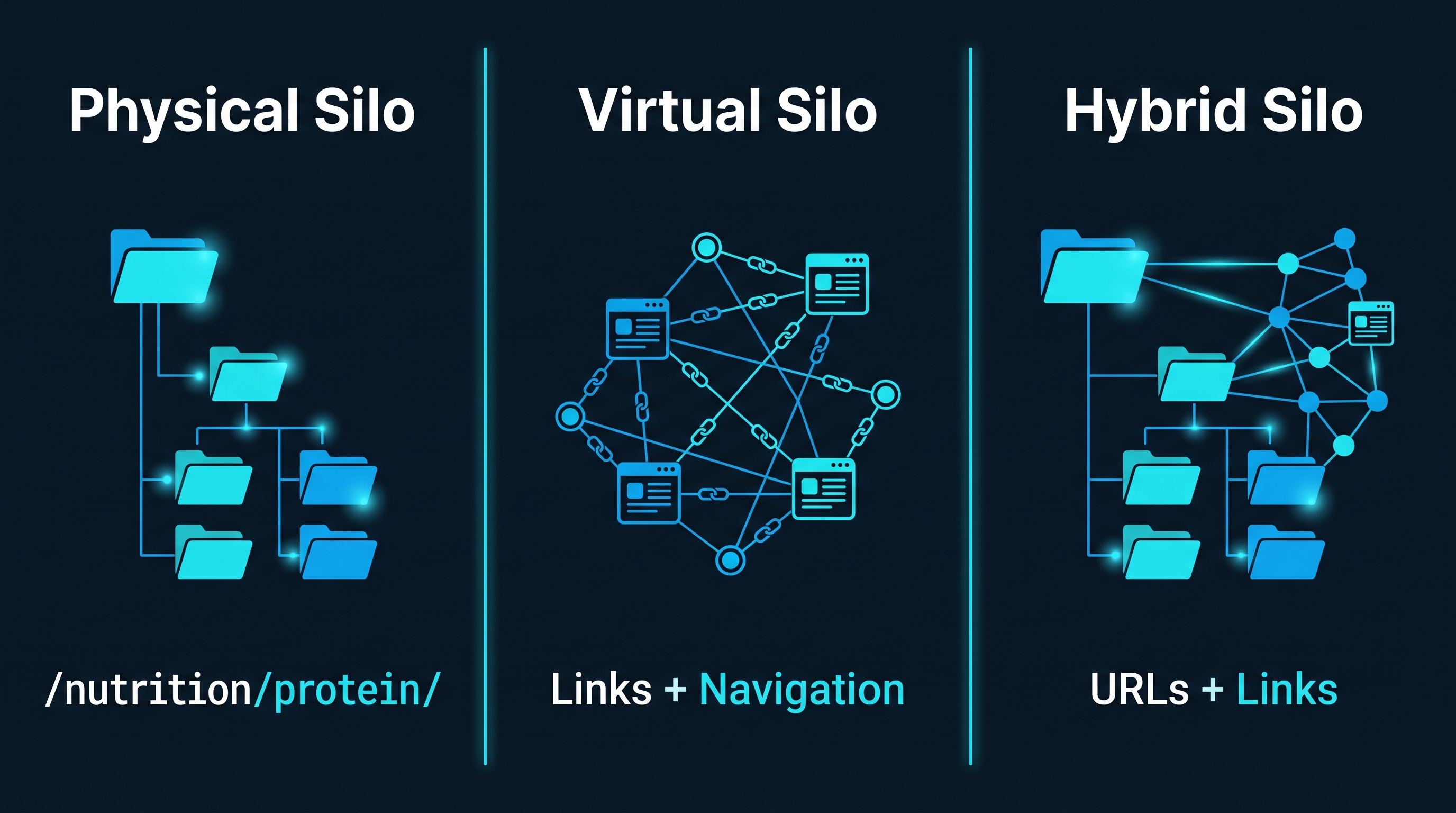
Sources describe two main implementations, physical and virtual, and some add a hybrid. Many also contrast strict silos with the more flexible topic cluster or pyramid model.
Approach | How it is built | Main strength | Main risk | Best for |
|---|---|---|---|---|
Physical silo | Folder structure in the URL, such as | Very clear hierarchy for users and crawlers | Changing URLs later requires redirects and care | New sites or planned rebuilds |
Virtual silo | Internal links, navigation, and breadcrumbs, regardless of URL | Flexible; no URL changes needed | Needs ongoing linking discipline | Existing sites with URLs you cannot change |
Hybrid silo | Folder URLs plus deliberate internal linking | Reinforces structure two ways | More upfront planning | Sites that can plan URLs and links together |
Strict silo | Any of the above, with no links between silos | Maximum topical separation | Blocks relevant cross-topic links | Rarely the best choice |
Soft silo / topic cluster / pyramid | Hub-and-spoke inside each topic, plus selective cross-links | Keeps structure without blocking useful links | Needs judgment on which cross-links to add | Most sites |
The strict-versus-soft distinction matters most. Ahrefs argues that the core problem with strict silos is that they prohibit relevant contextual links outside the silo, and recommends a pyramid structure without that restriction. Semrush reaches a similar position: silo-based architecture can work if the rules are loosened to allow links between sections, which is how topic clusters operate.
Should you build silos? A 6-point check
Before restructuring anything, check whether your site actually has a structure problem. One practitioner guide makes the point that a silo approach is high-impact only when it is validated by data.
1. Site size
Very small sites rarely need formal silos. If you have a few dozen pages, a clear menu and sensible links may be enough.
☐ Can a visitor reach every key page in two or three clicks today?
☐ Can you list all your pages on one screen?
2. Topic breadth
Silos pay off when you cover several distinct topics.
☐ Do you publish about three or more separate themes?
☐ Do visitors to one theme rarely need the others?
3. Current linking quality
☐ Do you have orphan pages?
☐ Do important pages receive few internal links?
☐ Are links mostly random "related posts" rather than deliberate?
Yes answers here point toward a structure project.
4. Keyword overlap
Silos help you assign each topic and intent to one owner page.
☐ Do several pages target the same query?
☐ Do you have two pages that could be merged?
5. URL flexibility
☐ Can your CMS change URLs without breaking links?
☐ Can you set up 301 redirects?
If not, a virtual silo built with links and navigation is the safer path.
6. Capacity to maintain it
☐ Is someone responsible for linking new posts into the structure?
☐ Will you re-check the structure after publishing batches of content?
A silo that nobody maintains decays into the same mess it was meant to fix.
How to build an SEO silo strategy in 7 steps
Step 1: Inventory pages and map search intent
Export every URL you have, along with its target query and current traffic. Group pages by the search intent they serve. Note duplicates, thin pages, and gaps.
Step 2: Define your silos
Pick a small number of broad themes that match how your audience thinks, not how your org chart looks. Each silo should map to a real service, product category, or core topic. Keep the list short enough that you can explain each silo in one sentence.
Step 3: Choose or build the hub page for each silo
Each hub should be the strongest, broadest page on its theme. It targets the main head term, explains the topic, and links clearly to every supporting page with descriptive anchors. If you already have a page that ranks for the head term, upgrade it rather than creating a competitor.
Step 4: Assign supporting pages, one intent per page
Every supporting page covers one subtopic or question. Move, merge, or rewrite pages that duplicate each other. Fill genuine gaps with new content. One vendor guide suggests a virtual silo needs a category page plus at least five supporting pages; treat that as a rule of thumb, not an official requirement. The right number is however many distinct intents your audience has.
Step 5: Set the linking rules
Decide the rules before you edit anything. See the linking rules cheat sheet below. In short: every supporting page links up to its hub, hubs link down to every supporting page, siblings link to each other when relevant, and cross-silo links are allowed when they help the reader.
Step 6: Align URLs, breadcrumbs, and navigation
If you use folder URLs, keep them shallow and consistent, such as /strength-training/adjustable-dumbbells/. Add breadcrumbs that show the path from home to hub to page. Make the main menu reflect your silos. If you cannot change URLs, rely on breadcrumbs, menus, and in-content links to express the structure.
Step 7: Publish, crawl, and fix
After updating links, crawl the site. Check that each supporting page is reachable from its hub, that no key page is orphaned, and that internal links point to final URLs rather than through redirect chains. Then monitor performance by section.
Worked example: a hypothetical store
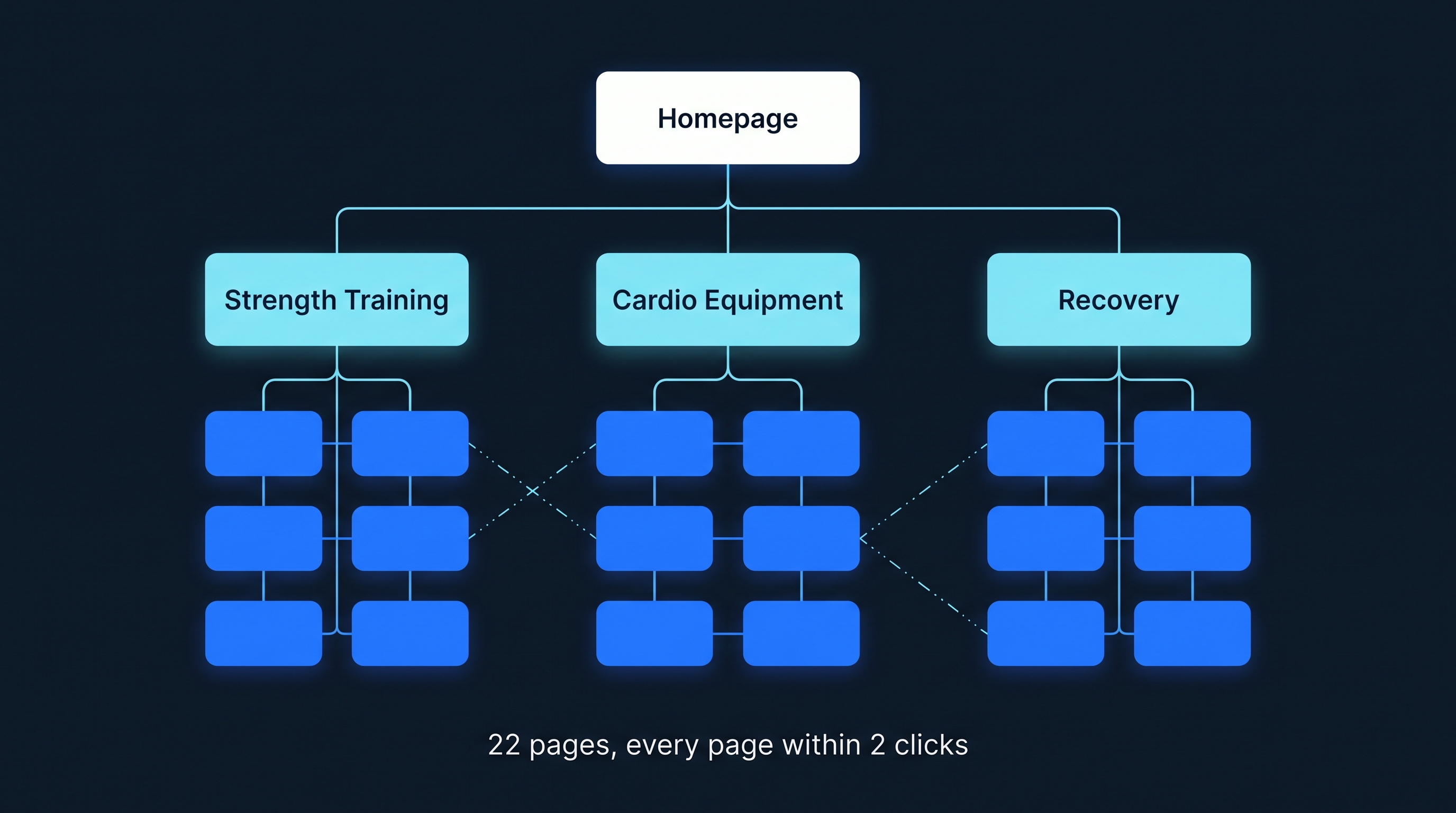
This example is invented for illustration and does not describe a real site or real results.
A home fitness store plans three silos:
Silo | Hub URL | Supporting pages |
|---|---|---|
Strength training |
| 6 |
Cardio equipment |
| 6 |
Recovery |
| 6 |
Page count: each silo has 1 hub plus 6 supporting pages, which is 7 pages. Three silos give 3 × 7 = 21 pages. Adding the homepage gives 22 pages.
Required structural links:
Hub to supporting pages: 6 per silo
Supporting pages back to hub: 6 per silo
Structural links per silo: 6 + 6 = 12
Across three silos: 12 × 3 = 36
Homepage to the three hubs: 3
Total required structural links: 36 + 3 = 39
Click depth: homepage to hub is 1 click, hub to supporting page is 2 clicks, so every page is within 2 clicks of the homepage.
On top of those 39 links, the store adds sibling links and a few deliberate cross-silo links. For example, an article on adjustable dumbbells can link to a recovery article on post-workout stretching, because a reader of one would plausibly want the other. A strict silo would forbid that link. The soft approach allows it.
Linking rules cheat sheet
Link | Rule | Why |
|---|---|---|
Homepage to hubs | Always | Gives each silo a clear entry point |
Hub to supporting pages | Always, with descriptive anchors | Ensures every supporting page is reachable |
Supporting page to hub | Always | Reinforces the topic relationship |
Supporting page to sibling | When relevant, usually a few | Helps readers move through the topic |
Supporting page to another silo | Only when it genuinely helps the reader | Keeps useful links without blurring structure |
Hub to hub | Through navigation or a "related topics" section | Lets users move between themes |
Footer | Keep to key pages; avoid linking every page | Mass footer links add little context |
Google's guidance also covers how to write the links themselves: use descriptive, reasonably concise anchor text that fits the sentence, and avoid placing many links right next to each other so each one keeps its surrounding context.
Mistakes and red flags
Forbidding all cross-silo links. This blocks helpful contextual links. Allow them when they serve the reader.
Over-engineering the structure. Overcomplicating the hierarchy is a commonly cited problem. Keep the number of silos and levels small.
Hubs that are just link lists. A hub should be a useful page on its own, not a directory with no content.
Two pages for one intent. Silos should clarify ownership of a topic. Merge or redirect duplicates.
Changing URLs without redirects. Moving pages without 301s and updated internal links causes broken links and lost signals.
Links that crawlers cannot follow. Use real
<a href>links in the HTML, not script-only navigation.Orphan pages. A page in the sitemap that no page links to is outside your structure.
Redirect chains in internal links. Point links at the final URL.
Padding silos with thin posts. Do not publish filler just to hit a page count.
Treating the structure as finished. New posts must be linked into the right silo, or the structure erodes.
How to audit and measure your silos
Audit checklist
☐ Crawl the site and compare crawled URLs with your sitemap. Sitemap URLs the crawl never reaches are orphan pages.
☐ Open the Links report in Google Search Console to see your most internally linked pages. Check that your hubs rank near the top.
☐ Confirm every supporting page links to its hub.
☐ Confirm every hub links to every supporting page.
☐ Check click depth from the homepage to each page.
☐ Find internal links pointing to redirects or error pages and update them.
☐ Review cross-silo links to make sure each one is relevant and not excessive.
What to measure
Organic clicks and impressions per silo, using the Performance report with a page filter on each folder or URL group
Number of indexed pages per silo
Number of orphan pages (target: zero for important pages)
Average click depth from a crawl
Rankings for each hub's head term and for supporting-page terms
Compare data from before and after the change over several weeks, and avoid judging from a single week. No source reviewed for this guide shows a guaranteed ranking gain from silos, so your own before-and-after data is the real test.
Estimated effort
These timelines are rough estimates, not benchmarks. A small site of a few dozen pages can often be reorganized within a couple of weeks if URLs stay unchanged. A large site with URL migrations needs a phased plan with redirect mapping and monitoring, and can take much longer.
Decision framework by site size
These thresholds are rules of thumb, not Google guidelines.
Site | Recommended approach | Avoid |
|---|---|---|
Very small (a few dozen pages) | Clear menu, sensible links, simple hubs if needed | Heavy restructuring |
Growing blog or service site | Virtual or hybrid soft silos with hub pages | Strict no-cross-link rules |
Ecommerce store | Category hubs, buying guides linked to products, selective cross-links | Deep nesting that buries products |
Large publisher or documentation site | Topic hubs, audits for orphans, phased URL changes | Big-bang migrations without monitoring |
FAQ
What is an SEO silo strategy?
An SEO silo strategy organizes a website into topic-based sections, each led by a hub page that links to supporting pages on subtopics. Internal links mostly stay inside the section, which makes the topical focus clear to visitors and search engines. In practice, most sites use a softer version that still allows relevant cross-links.
Does Google require silos?
No. The Google link guidance reviewed for this article covers crawlable links and descriptive anchor text, and it does not present silos as a requirement. Google's John Mueller has said, as reported by Ahrefs, that a top-down structure with cross-linking helps Google understand page context better than isolated silos. Use silos as an organizing method, not a ranking requirement.
What is the difference between a physical and a virtual silo?
A physical silo uses folders in the URL, such as /nutrition/protein/, to group pages. A virtual silo groups pages mainly through internal links and navigation, whatever the URL looks like. Virtual silos are more flexible but need careful linking discipline. A hybrid uses both and can suit blogs and stores that can plan URLs in advance.
Can pages in different silos link to each other?
Yes, when the link is genuinely useful to the reader. Strict silo rules forbid cross-silo links, which Ahrefs argues blocks relevant contextual opportunities. A softer approach keeps most links inside the silo and adds a small number of relevant cross-silo links in body text.
How many pages should a silo have?
There is no official number. One vendor guide suggests a category page plus at least five supporting pages for a virtual silo, but treat that as a rule of thumb. Build as many supporting pages as you have distinct search intents to cover, and avoid padding with thin posts just to reach a count.
Will a silo structure improve my rankings?
It can help indirectly by making crawling, topical clarity, and internal link distribution cleaner, but no source reviewed here proves a guaranteed ranking gain, and vendor claims vary. Validate it with your own data: compare impressions, clicks, and indexed pages for each section before and after the change.
Is silo structure still relevant for AI search?
A clear structure helps any crawler follow links and understand how topics relate, but claims that silos boost citations in AI answers are unproven. Focus on what you can control: crawlable links, clear definitions, well-organized hub pages, and content that answers specific questions directly.
How do I find orphan pages?
Run a site crawl and compare the crawled URLs with your sitemap. Sitemap pages that the crawl never reaches through links are orphans. Search Console's Links report also shows which pages receive the most internal links. Fix each orphan with a contextual link from a relevant hub or supporting page.
Should I change my URLs to match my silos?
Only if the change is worth the risk. Moving URLs requires 301 redirects, updated internal links, and sitemap changes, and a messy migration can cost traffic. If your current URLs work, build a virtual silo through links, breadcrumbs, and navigation instead of restructuring folders.
How do I measure whether my silos are working?
Track organic clicks and impressions by section using Search Console's page filter, plus indexed page counts, orphan page counts, and average click depth from a crawl. Compare several weeks of data before and after the changes, and avoid drawing conclusions from a single week of results.
Next steps
Export your URLs and group them by topic and search intent.
Pick three to seven silo themes and name a hub page for each.
Mark duplicates, thin pages, and orphans for merging, rewriting, or linking.
Write your linking rules down before editing any page.
Update links, add breadcrumbs, and align navigation.
Crawl the site, fix orphans and redirect chains, and track performance per section.
If you would rather have an expert review your current structure and plan the silos for you, get in touch with Abir Hasan Sabbir for an SEO site architecture review, or explore the services of ISprout Digital Agency.
Sources
All sources were checked on October 10, 2026.