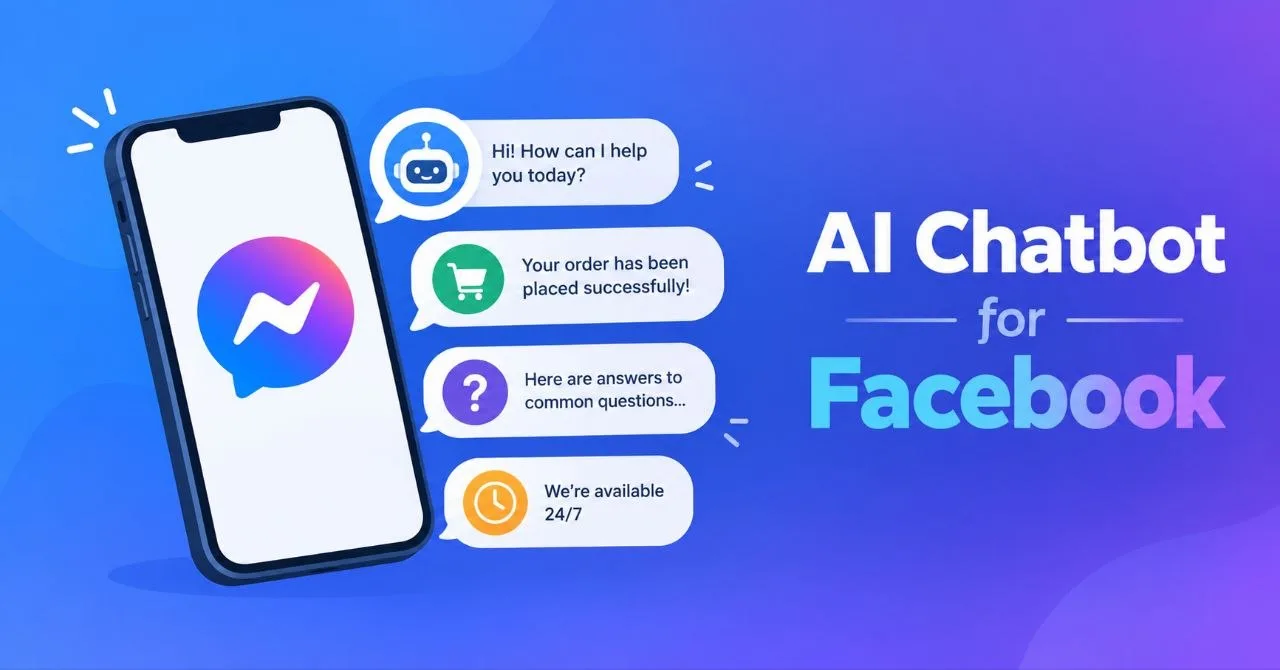
If you run a business in Bangladesh, your customers are on Facebook. But as your page grows, so do the messages—hundreds of questions about price, availability, and delivery. Answering them all instantly is impossible, and slow replies mean lost sales. The solution is an ai chatbot for facebook page, a 24/7 digital assistant that can handle common queries, take orders, and qualify leads without you lifting a finger. You can build a powerful AI chatbot for your Facebook Page to automatically take orders, answer common questions, and qualify leads, even if you have zero coding experience. This guide will show you how, step-by-step.
Key Takeaways
- Start Simple: Begin with a rule-based chatbot for core tasks like FAQs and order taking before moving to complex AI.
- Focus on Key Jobs: A successful chatbot excels at three things: answering frequently asked questions, processing f-commerce orders, and knowing when to hand off to a human.
- Choose the Right Tool: User-friendly platforms like Manychat are perfect for beginners, while tools like n8n offer deep customization for advanced users.
- Map Your Flow First: Before you build, sketch out the conversation paths on paper to ensure a logical and user-friendly experience.
- Always Test Thoroughly: Preview and test every button, keyword, and flow yourself before letting your chatbot interact with customers.
In This Article
- Why Your Bangladeshi Business Needs a Facebook Chatbot
- Types of Chatbots: From Simple Replies to Smart AI
- Choosing the Right Chatbot Platform for Your Page
- How to Build an AI Chatbot for Your Facebook Page (Step-by-Step)
- Common Mistakes to Avoid
- Frequently Asked Questions
- Your Next Steps
- Related Reading
- Sources
Why Your Bangladeshi Business Needs a Facebook Chatbot
A Facebook chatbot is essential for your Bangladeshi business because it provides instant 24/7 customer service, automates order taking for f-commerce, and captures leads directly from Messenger, which is where most local customers interact. In a market where "f-commerce" thrives and customers expect immediate responses, a chatbot isn't a luxury—it's a competitive necessity. It frees you from repetitive tasks, ensures no lead is missed, and offers a professional experience that builds trust and drives sales, even while you sleep.
Types of Chatbots: From Simple Replies to Smart AI
There are two main types of chatbots: rule-based bots that follow a fixed script and AI-powered bots that use natural language processing to understand and respond to user queries more flexibly. Understanding the difference is key to choosing the right starting point for your business.
Rule-Based (Menu/Button) Chatbots
These are the most common and straightforward chatbots. They work like an interactive phone menu (IVR). The user is presented with a set of buttons or a menu, and their choices dictate the conversation path. They are perfect for predictable, structured tasks.
- Best for: FAQs, taking orders with specific steps, booking appointments, showing a product catalog.
- Pros: Easy to build, predictable, low cost.
- Cons: Can't handle questions outside their pre-defined rules. Can feel rigid if the user has a unique query.
AI-Powered (NLP) Chatbots
These chatbots use Natural Language Processing (NLP) to understand the user's intent, even if the phrasing is unusual. Instead of just recognizing a keyword like "price," they can understand "how much is this?" or "dam koto?". They learn from conversations and can be trained on your specific business data to provide highly relevant answers.
- Best for: Advanced customer support, handling a wide range of questions, personalizing user experience.
- Pros: More human-like, flexible, can handle complex queries.
- Cons: More complex to set up, can be more expensive, requires training.
Which Should You Start With?
For most small businesses and f-commerce pages in Bangladesh, a hybrid model is the perfect start. Use a rule-based menu for your core services ("🛍️ Place Order," "ℹ️ See Policies") and supplement it with AI-powered keyword recognition for common questions ("price," "delivery," "location"). This gives you the best of both worlds: structure and flexibility.
Choosing the Right Chatbot Platform for Your Page
The best chatbot platform for your page depends on your budget, technical skill, and business needs, with tools like Manychat offering a user-friendly starting point and platforms like n8n providing ultimate flexibility for complex workflows. While there are many options, here’s a breakdown of popular choices relevant for the Bangladeshi market.
| Feature | Manychat | UChat | n8n (as a backend) |
|---|---|---|---|
| Best For | Beginners, F-commerce, Marketers | Power Users, Multi-channel Support | Custom Logic, Deep Integration |
| Ease of Use | Very Easy (Visual Flow Builder) | Moderate (More features to learn) | Advanced (Requires technical setup) |
| Pricing Model | Free tier, then per subscriber | Free tier, then per subscriber | Free if self-hosted, or usage-based on cloud |
| Bangladesh Context | Very popular and easy to start with. Excellent for standard f-commerce flows. | Great for businesses also active on WhatsApp, Telegram, etc. | The ultimate `manychat alternative` for custom needs, like calculating delivery charges based on specific Thanas or integrating with local courier APIs. |
For this tutorial, we will use Manychat because it offers the fastest and easiest way to build a powerful and effective `messenger chatbot` with no code.
How to Build an AI Chatbot for Your Facebook Page (Step-by-Step)
To build your first AI chatbot, you will connect your Facebook Page to a platform like Manychat, design a conversation flow using its visual builder, set up keywords for automated replies, and test it before activating it for all your visitors. Let's go through each step in detail.
Step 1: Connect Your Facebook Page to Manychat
First, you need an account. Go to the Manychat website and sign up. It will prompt you to log in with your Facebook account. Grant the necessary permissions and select the Facebook Page you want to build a chatbot for. The process is secure and takes only a few clicks.
Step 2: Create Your Welcome Message
The Welcome Message is the first thing a user sees when they message your page for the first time. It sets the tone and guides them on what to do next. Navigate to Settings > Messenger and edit the "Welcome Message" field. A good welcome message is friendly and has clear calls to action.
Example: "Hi {{user_first_name}}, welcome to our page! 👋 How can we help you today? Please choose an option below."
Below this message, you should have your Main Menu flow trigger, offering clear buttons like "🛍️ Shop Products," "💬 Ask a Question," or "📍 Track Order."
Step 3: Design Your Main Menu and FAQ Flow
Think of this as the homepage of your chatbot. Go to the "Automation" tab in Manychat and create a new flow. Use the visual flow builder to add messages and buttons. For an FAQ flow, a user might click "Ask a Question," which leads to another message with buttons for "Delivery Info," "Payment Methods," and "Return Policy." Each of these buttons then triggers a message with the corresponding answer.
Step 4: Build an Automated Order-Taking Flow (F-commerce Focus)
This is where your `f-commerce chatbot` becomes a sales machine. This flow automates the entire order collection process, which is crucial for any online shop in Bangladesh.
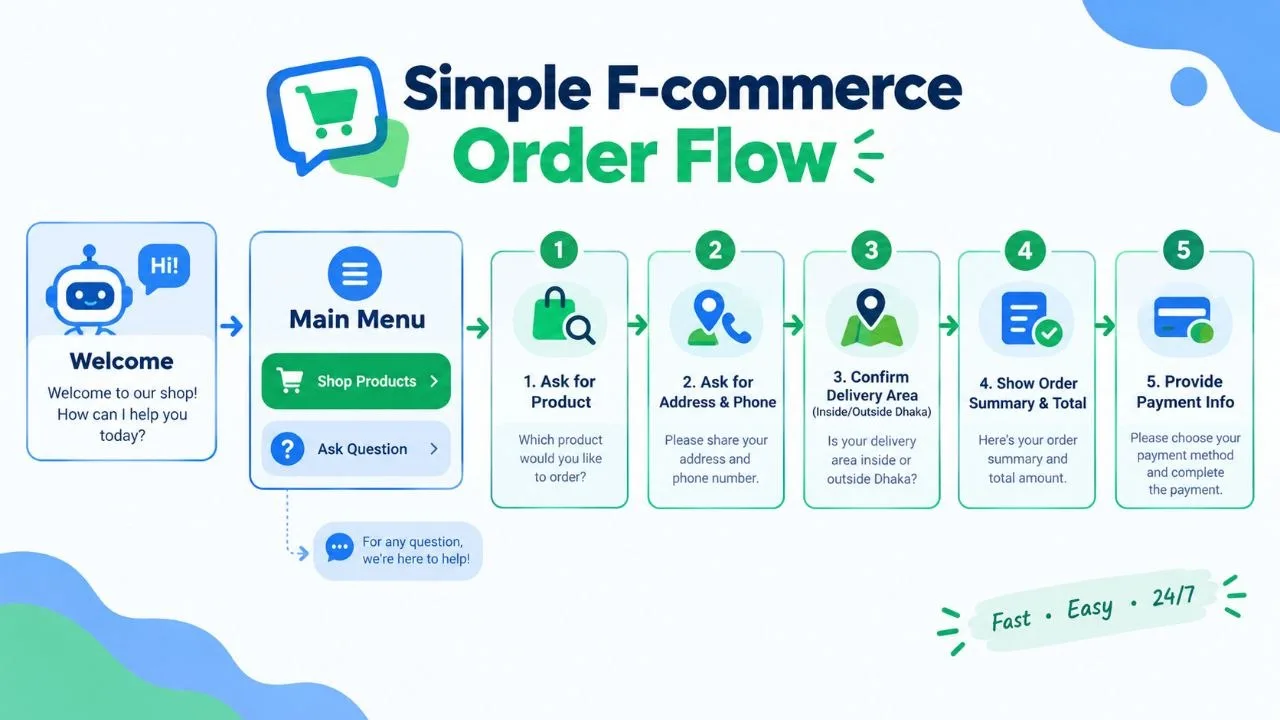
- Start the Flow: Create a new flow triggered by a button ("🛍️ Place Order") or a keyword ("order").
- Collect Product Details: The first message should ask, "Which product would you like to order? Please provide the name or code." Use the "User Input" element to save their reply to a variable.
- Collect Contact Info: Ask for their Full Name, Full Address, and Phone Number in sequence, saving each piece of information. For the phone number, set the reply type to "Phone" to ensure a valid format.
- Calculate Delivery Charge: This is key for local context. Ask the user to choose their delivery area with buttons: "📍 Inside Dhaka" and "🚚 Outside Dhaka." Based on their choice, use the "Condition" element to set a delivery charge variable (e.g., BDT 80 for inside Dhaka, BDT 150 for outside).
- Present Order Summary: Display all the collected information for confirmation. "Thanks, {{user_first_name}}! Please confirm your order: Product: [Product Variable] Address: [Address Variable] Phone: [Phone Variable] Total: [Price] + [Delivery Charge] = [Total Price] Is this correct?" Give them "Yes, Confirm" and "No, Edit" buttons.
- Provide Payment Instructions: Once confirmed, send your payment details. "Thank you! Your order is confirmed. Please send the total amount to our bKash/Nagad number: 01xxxxxxxxx and use your name as a reference."
Step 5: Set Up AI Keywords for Auto-Replies
This feature handles questions that don't fit your button flows. Go to Automation > Keywords. Here you can set up rules that trigger a message when a user types a specific word or phrase.
- Rule 1: If message contains `price` OR `dam` OR `koto` -> Send reply: "Thanks for asking! Could you tell me which product's price you'd like to know? You can see all our products here: [Link to Shop]"
- Rule 2: If message contains `delivery charge` OR `delivery cost` -> Send reply: "Our delivery charge is BDT 80 inside Dhaka and BDT 150 outside Dhaka."
- Rule 3: If message is `thanks` OR `thank you` -> Send reply: "You're welcome! 😊"
Step 6: Configure the Human Handoff
No bot is perfect. Sometimes, a customer needs to talk to a real person. A smooth handoff is crucial. Create a keyword rule for terms like `human`, `agent`, `help`, or `kotha bolbo`. This rule should trigger an "Action" to "Notify Admins" and simultaneously send a message to the user saying, "I'm connecting you to a team member now. They will be with you shortly." This pauses the bot in that conversation, allowing you to take over from the Live Chat inbox.
Step 7: Test and Launch Your Chatbot
Before unleashing your bot on your customers, test it rigorously. In the Manychat flow builder, click "Preview" to send the flow to your own Messenger account. Click every button, test every keyword, and go through the entire order process. Check for typos, broken logic, and dead ends. Once you are confident everything works as expected, go to Settings > General and enable the chatbot.
Common Mistakes to Avoid
The most common mistakes to avoid are creating overly complex flows, hiding the option to speak to a human, not setting clear expectations, and forgetting to test every path before launching. Here are a few pitfalls to watch out for:
- Overly Complicated Menus: Too many buttons and options will confuse and frustrate users. Keep your main menu to 3-4 core choices.
- No Escape Hatch: Always provide a clear and easy way for users to reach a human agent. Hiding this option leads to immense frustration.
- Unnatural Language: Don't try to trick users into thinking your bot is human. Use clear, simple language. Emojis can help make it feel more friendly and less robotic.
- Dead Ends: Ensure every button and conversation path leads to a conclusion, whether it's an answer, a confirmation, or a handoff to a human.
- Forgetting to Update: If your prices, products, or policies change, you must update your chatbot immediately. An outdated bot is worse than no bot at all.
Frequently Asked Questions
How much does a Facebook chatbot cost in Bangladesh?
For most businesses, you can start for free. Platforms like Manychat offer a free plan for up to 1,000 contacts. Paid plans with more advanced features typically start from $15 USD per month and increase based on the number of subscribers. The cost depends entirely on the platform and scale you choose.
Can a chatbot automatically reply to comments on my Facebook posts?
Yes, absolutely. Most chatbot platforms, including Manychat, have a "Comment Growth Tool." You can set it up to automatically send a private message in Messenger to anyone who comments on a specific post. This is a powerful way to turn post engagement into leads and sales.
Is Manychat better than Facebook's own auto-reply feature?
Yes, significantly. Facebook's built-in auto-replies are very basic; they can only send a simple, static message. A platform like Manychat allows you to build entire interactive conversation flows, ask questions, save user data, segment audiences, and integrate with other tools. It’s a complete marketing automation platform.
How long does it take to build a basic chatbot?
Following this guide, you can build a solid foundational chatbot for FAQs and order-taking in about 2-3 hours, even as a complete beginner. The key is to have your conversation flows planned out beforehand. The actual implementation in a tool like Manychat is quite fast.
Can my chatbot speak Bangla?
Yes, you can write all your chatbot's messages and buttons in Bangla. The tools themselves have an English interface, but the content your users see can be in any language. You can even create keyword triggers for common Banglish phrases like "koto?" or "address ki?" to make it more intuitive.
What is the best Manychat alternative?
The best alternative depends on your needs. For users who want more multi-channel support (WhatsApp, Instagram), UChat is a strong contender. For advanced users who need full control and custom logic for zero cost, a self-hosted n8n workflow connected to a Messenger API is the most powerful option.
Will a chatbot hurt my customer relationships?
Not if implemented correctly. A good chatbot enhances customer relationships by providing instant answers to simple questions, which customers appreciate. The key is to ensure there is always a clear and easy option to "talk to a human" for complex issues that require a personal touch.
How do I get users to interact with my chatbot?
Promote it actively. Use Facebook's "Send Message" button on your posts and ads, directing users into a specific chatbot flow. You can also add a "Message Us" button to your website or use QR codes on physical marketing materials that link directly to your Messenger bot.
Your Next Steps
You now have the complete blueprint for building a powerful `ai chatbot for facebook page`. It's time to put it into action.
- Map Your Ideal Conversation: Before you even log into Manychat, take a pen and paper and sketch out the most common questions you get and the exact steps of your order process.
- Sign Up for a Free Manychat Account: Follow the steps in this guide to connect your page. The free plan is more than enough to get started.
- Build One Flow First: Start with the simplest and most impactful flow for your business, likely the FAQ flow. Get comfortable with the builder.
- Implement the Order-Taking Flow: Once you're ready, carefully build the f-commerce order flow. This is the part that will save you the most time.
- Consider Advanced Automation: For complex needs like connecting your chatbot orders directly to a Google Sheet, sending SMS confirmations, or integrating with courier services, you'll need a more powerful backend. This is where tools for AI automation for small business shine.
Ready to automate your Facebook page and save hours every week? If you want a custom solution that goes beyond the basics, I can help. Book a free consultation on my AI Workflow Automation service and let's build a solution tailored for your business.
Related Reading
- n8n WhatsApp Automation: Build a WhatsApp Auto-Reply Bot
- AI Automation for Small Business in Bangladesh: Complete 2026 Guide
Sources
- Facebook Messenger Chatbot for Business
- Facebook chatbots for business: A complete guide for 2026
- 5 Best Facebook Chatbots in 2026 (Free & Paid)
- Facebook Messenger chatbot
Checked on 2026-10-23.