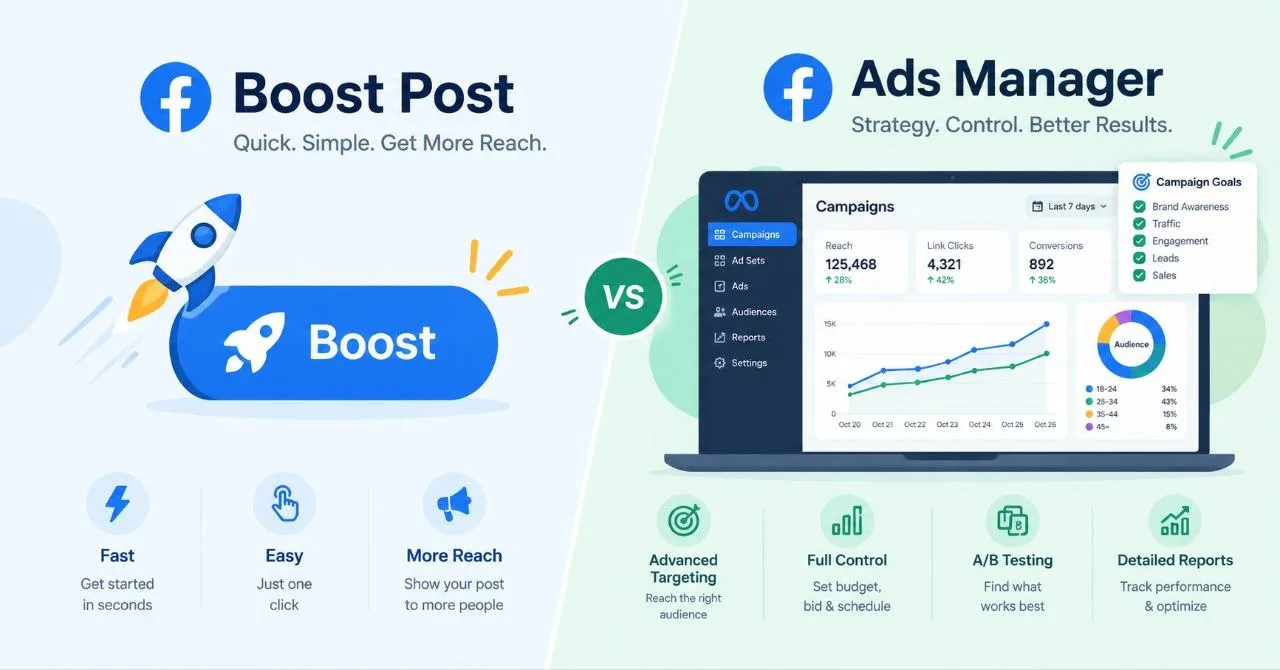
If you manage a Facebook or Instagram page for your business in Bangladesh, you’ve seen that tempting blue “Boost Post” button. It promises more reach and engagement with just a few clicks. But right next door is the far more complex and powerful Meta Ads Manager. This leaves many business owners wondering: in the battle of boost post vs ads manager, which one will actually grow my business?
This guide is for any Bangladeshi entrepreneur, f-commerce seller, or marketer who wants to stop wasting money and start getting real results from their Meta advertising. The short answer is: use the "Boost Post" button for quick visibility and engagement on an existing post, but use Meta Ads Manager for strategic campaigns designed to generate leads, sales, and a measurable return on investment.
Key Takeaways
- Simplicity vs. Control: Boosting is fast and easy. Ads Manager is complex but offers complete control over every aspect of your campaign.
- Objectives Matter: Boosting is limited to goals like engagement, video views, or messages. Ads Manager unlocks crucial business objectives like Conversions (sales), Lead Generation, and Catalog Sales.
- Targeting Power: Ads Manager provides vastly superior audience targeting, including Custom Audiences (retargeting your website visitors) and Lookalike Audiences.
- Cost-Effectiveness: While boost post cost can seem low, Ads Manager almost always delivers a lower cost per result (like a sale or lead) because of its advanced optimization features.
- The Verdict: Start with boosts if you must, but graduate to Ads Manager as quickly as possible for serious business growth.
In This Article
- The Verdict at a Glance: Which Tool Wins for Your Goal?
- Boost Post vs. Ads Manager: Side-by-Side Comparison
- What is a Boosted Post (and When is it Enough)?
- What is Meta Ads Manager (and Why is it Worth Learning)?
- The Financial Impact: Boost Post Cost vs. Ads Manager ROI
- Making the Switch: How to Move from Boosting to Ads Manager
- Frequently Asked Questions
- Next Steps for Your Business
- Related Reading
- Sources
The Verdict at a Glance: Which Tool Wins for Your Goal?
The right tool depends entirely on your objective. There is no single winner, only the right choice for a specific job. Think of it as the difference between a simple hammer and a full-power drill—both are useful, but for different tasks.
For quick brand awareness or getting more likes on a great post: Boost Post is good enough.
For generating sales, finding new customer leads, or retargeting past visitors: Ads Manager is the only choice.
Boost Post vs. Ads Manager: Side-by-Side Comparison
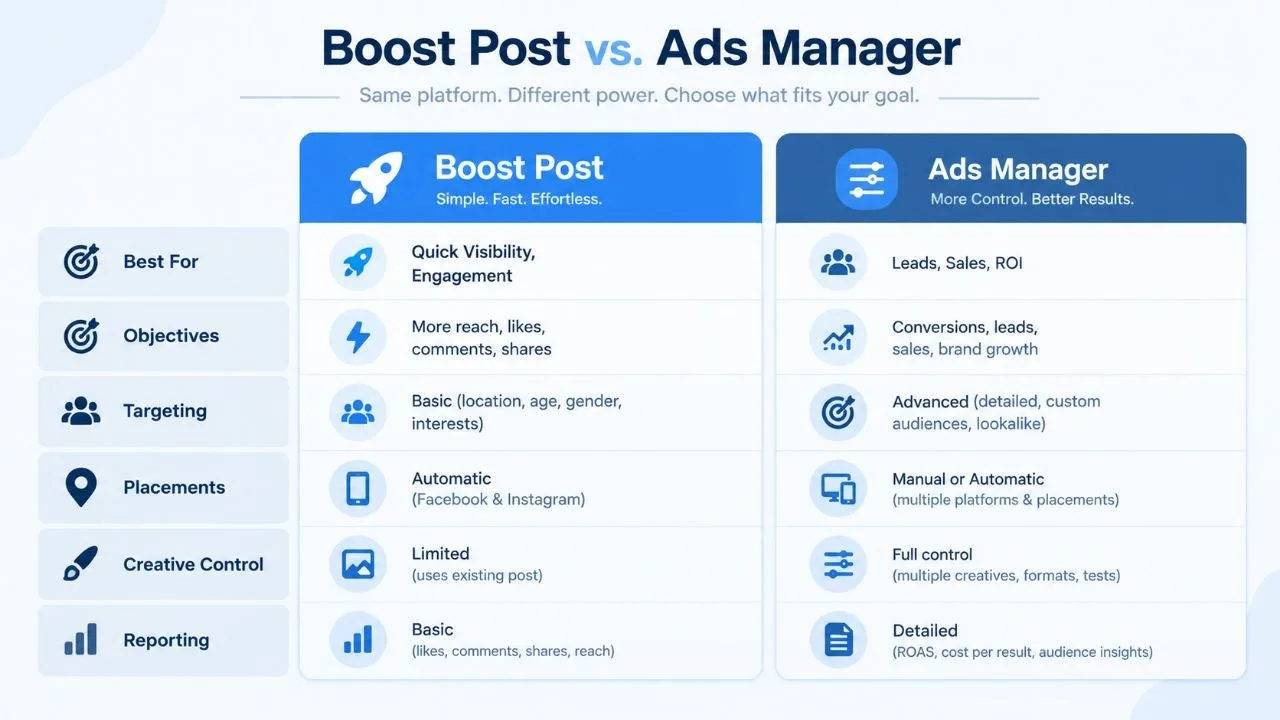
Let's break down the fundamental differences. While a boosted post is technically an ad that runs through the Ads Manager backend, the creation process and available features are worlds apart.
| Feature | Boost Post | Ads Manager |
|---|---|---|
| Best For | Simplicity, speed, increasing reach/engagement on existing posts. | Control, performance, achieving specific business goals (leads, sales). |
| Campaign Objectives | Limited: Engagement (Post engagement, Page likes), Website Visitors (Traffic), Messages, Calls. | Full Suite: Awareness, Traffic, Engagement, Leads, App Promotion, Sales (including conversions and catalog sales). |
| Audience Targeting | Basic: Location, Age, Gender, some interests. Option to target people who like your page. | Advanced: Detailed demographics, interests, behaviors, custom audiences (website visitors, customer lists), lookalike audiences, and layered combinations. |
| Ad Placements | Automatic (recommended) or limited manual selection (e.g., Facebook Feed, Instagram Feed). | Full Control: Choose exactly where your ads appear across Facebook, Instagram, Messenger, and Audience Network (e.g., Feeds, Stories, Reels, In-stream video, search results). |
| Creative Control | Uses an existing page post. You cannot change the image/video or text. | Total freedom. Create ads from scratch ("dark posts") that don't appear on your page. A/B test different images, videos, headlines, and copy. |
| A/B Testing | Not available. | Built-in feature to systematically test audiences, creatives, and placements to find what works best and lower costs. |
| Optimization & Bidding | Highly automated and simplified. You set a budget and duration. | Full control over bid strategy (e.g., lowest cost, cost cap), optimization goal (e.g., optimize for link clicks vs. landing page views), and budget allocation (daily vs. lifetime). |
| Reporting & Analytics | Basic metrics: Reach, engagement, link clicks. | Comprehensive data: Full access to all metrics, including Cost Per Result, Conversion Rate, Return On Ad Spend (ROAS), and detailed audience breakdowns. |
What is a Boosted Post (and When is it Enough)?
A boosted post is the simplest form of advertising on Meta's platforms. You take an existing post from your Facebook or Instagram timeline, add a budget, select a simple goal and audience, and let it run. It’s designed to be intuitive and fast.
The "Boost Post" button (which now often appears as just "Boost" or "Promote" in Meta Business Suite) is a shortcut to an ad campaign. It’s perfect for business owners who are short on time or find the main Ads Manager interface intimidating.
Use Cases for Boosting a Post:
- Announcements: You have a post about a new store location in Dhaka, a holiday closure, or a special event. Boosting ensures more of your followers and a local audience see it.
- Content Amplification: An organic post is getting a lot of likes and shares. Boosting it can create a snowball effect, extending its viral reach.
- Driving Blog Traffic: You’ve written a helpful article, like this one. A simple boost with a "Website Visitors" objective can get more people reading it.
- Testing an Idea: Before committing to a full campaign, you can boost a post with a small budget (e.g., 500-1000 BDT) to see if the creative or message resonates with your audience.
What is Meta Ads Manager (and Why is it Worth Learning)?
Meta Ads Manager is the central command center for all advertising on Facebook, Instagram, Messenger, and the Audience Network. It’s a professional-grade tool that provides granular control over every variable of your ad campaigns. While its interface can be daunting, learning to navigate it is the single most important step towards profitable advertising.
Every serious advertiser uses Ads Manager because it unlocks the platform's true power. For a complete introduction to the platform, our Facebook Ads Bangladesh guide for beginners is a great place to start.
Use Cases for Ads Manager:
- Lead Generation: As a digital marketing specialist, I use Ads Manager to generate high-quality leads for service businesses. For my client Naria Travels and Tours, we run lead generation campaigns to find people interested in specific tour packages. A simple boost could never achieve this level of precision.
- E-commerce & F-commerce Sales: For my own project, be Skillify, which sells digital marketing resources, Ads Manager is non-negotiable. We use "Sales" campaigns optimized for "Conversions" to track exactly which ads lead to purchases and measure our Return On Ad Spend (ROAS). This is essential for any online store.
- Retargeting Campaigns: Ads Manager allows you to create Custom Audiences. This means you can show specific ads to people who have already visited your website, added an item to their cart, or engaged with your Instagram profile. This is one of the most profitable forms of advertising.
- Building a Sales Funnel: You can guide a customer from awareness to purchase. Show a video ad to a cold audience (Awareness), then retarget viewers with a Traffic ad to your website, and finally, show those who visited the site a Conversion ad with a special offer.
The Financial Impact: Boost Post Cost vs. Ads Manager ROI
A common question is whether boosting is cheaper. Both methods draw from the same ad account and budget. The difference isn't the price, but the value you get for your money.
The boost post cost might feel lower because you can spend a small amount like 500 BDT for a few days. However, because the objective is simple (e.g., engagement), you might get 100 likes but zero sales. Your "Cost Per Like" is low, but your "Cost Per Sale" is infinite.
In Ads Manager, you can run a "Sales" campaign with the same 500 BDT. Because the algorithm is specifically trying to find people likely to buy, you might get only 10 likes but one sale of 2000 BDT. Your "Cost Per Like" is higher, but you have a positive return on your investment. To understand budgeting better, read our deep dive into Facebook Ads cost in Bangladesh.
Over time, Ads Manager almost always produces a better Return On Investment (ROI) because you are aligning your spending directly with a business outcome, not just a vanity metric. It shifts the focus from 'How many people saw my ad?' to 'How much revenue did my ad generate?'
Making the Switch: How to Move from Boosting to Ads Manager
Graduating from boosting to Ads Manager is a key growth step. It doesn't have to be terrifying. Here’s a simple path to get started.
- Identify Your True Goal: Before you open the tool, ask: "What do I want a customer to do?" Is it to buy, fill out a form, or send a message? This will determine your campaign objective.
- Explore Ads Manager: Go to facebook.com/adsmanager. Click around. Look at the "Create" button and see the list of objectives. You can’t break anything by just looking.
- Recreate a "Boost" as a Campaign: Try creating your first campaign. Click "Create" -> choose the "Engagement" objective -> select "Post Engagement." In the ad set, you can target your audience. At the ad level, you can select an existing page post. Congratulations, you’ve just manually done what the boost button does, but with more control.
- Launch Your First "Real" Campaign: For your next attempt, try a "Traffic" campaign pointing to your website or a "Leads" campaign to collect customer information. Start with a small budget and see how the results differ from your past boosts.
The learning curve is real. If you find yourself struggling to set up tracking, define audiences, or analyze results, it might be time to seek professional help. A dedicated Facebook and Instagram ads management service can handle the complexity for you, ensuring your budget is invested, not just spent.
Frequently Asked Questions
Is a boosted post the same as a Facebook ad?
Yes, a boosted post is technically a real Facebook ad, but it's created using a simplified interface with limited options. Ads Manager gives you access to the full range of features, objectives, and controls for creating much more sophisticated and effective ad campaigns.
Can I see my boosted post results in Ads Manager?
Yes, you can. Every time you boost a post, Meta automatically creates a campaign for it in your Ads Manager account. You can go there to see more detailed performance data, but you won't be able to change the core campaign settings after it's launched.
What is the minimum boost post cost in Bangladesh?
While Meta's official minimum is $1 USD per day (around 120-125 BDT), the actual cost for results depends on your audience and goals. For a detailed breakdown of what to expect, see our guide on Facebook Ads cost in Bangladesh.
Which is better for getting more followers?
Both can work, but Ads Manager is generally more efficient. It allows you to run a dedicated "Page Likes" campaign or an Engagement campaign optimized for follows. Boosting can get you followers, but it's not the primary, optimized goal.
Can I target specific interests with a boosted post?
You can do some basic interest and demographic targeting with a boosted post. However, Ads Manager unlocks advanced targeting, including layered interests, behaviors, custom audiences (like website visitors), and powerful lookalike audiences that find new customers similar to your existing ones.
Why are my boosted post results so poor?
Poor results often come from a mismatch between your goal and the tool. Boosting is optimized for simple metrics like reach or engagement. If you need sales or leads, you're using the wrong objective. Ads Manager lets you align your campaign directly with your business goals.
What is a "dark post"?
A dark post is an ad created in Ads Manager that appears in people's feeds but not on your organic Facebook Page timeline. This is incredibly useful for A/B testing different images, copy, or offers without spamming your followers with multiple variations of the same ad.
Should I stop boosting posts completely?
Not necessarily. The 'Boost Post' button is a tool with a specific purpose: quick, easy amplification of an existing post to get more eyes on it. For simple awareness goals, it's fine. For any goal tied to revenue or customer acquisition, you should use Ads Manager.
Next Steps for Your Business
It's time to move from theory to action. Here’s what you should do this week:
- Audit Your Last Boost: Look at the results of your last boosted post. How many likes did you get? How many clicks? Now ask the hard question: How many sales or qualified leads did it generate? This will highlight the gap between engagement and business results.
- Explore Ads Manager for 15 Minutes: Simply log in and familiarize yourself with the layout. Don't try to launch anything. Just look at the campaign objectives and the audience targeting options.
- Run a Small Test: Dedicate a small budget (even 1,000-2,000 BDT) to run your first campaign in Ads Manager. Choose a "Traffic" or "Leads" objective and compare the performance to a simple boost.
- Analyze and Decide: Is learning Ads Manager a good use of your time, or is your time better spent running your business? Be honest with yourself about where your skills and focus should be.
Ultimately, the choice between a boost post and Ads Manager is a choice between short-term visibility and long-term, strategic growth. If you want to unlock the full power of Meta Ads without the steep learning curve, my Meta Ads management service can help you build strategic campaigns that deliver measurable results for your business.
Related Reading
- Facebook Ads Bangladesh: The Complete Guide for Beginners (2026)
- Facebook Ads Cost in Bangladesh 2026: Budget, CPM & What to Expect
Sources
- Boosted posts vs. ads: What to know in 2026
- Differences between boosted posts and ads
- Boosting vs Ads Manager: The Key Difference (2026)
Checked on 2026-10-29.